Sandbox
5 minute read
Overview
The sandbox is a secure, isolated code execution environment that OnCall AI uses during investigations. When OnCall AI encounters large or complex datasets, it writes and runs Python or Bash scripts in the sandbox to analyze the data programmatically — computing statistics, correlating patterns across logs, and validating hypotheses with code.
The sandbox is enabled for every organization automatically. There is no configuration required and no new UI — OnCall AI activates it transparently when needed. Investigations that use the sandbox produce richer, more data-driven analysis.
When the sandbox activates
The sandbox uses lazy activation. It spins up only when OnCall AI encounters data that benefits from programmatic analysis — specifically, when tool results exceed approximately 10,000 characters or 200 lines. At that point, the data is stored in the sandbox workspace and OnCall AI writes scripts to process it.
The workspace persists across sub-steps within the same investigation, so OnCall AI can build on previous analysis results without re-fetching or reprocessing data.
What the sandbox provides
| Capability | Description |
|---|---|
| Script execution | Write and run Python or Bash scripts for data analysis |
| File system access | Read and write files in an isolated environment |
| Local data storage | Store large tool outputs and API responses for processing |
| Bash commands | Execute shell commands to inspect, parse, or transform data |
| Repository cloning | Clone Git repositories to analyze full codebases |
How OnCall AI uses the sandbox
During a typical investigation:
- OnCall AI queries data sources. A monitor alert, PagerDuty incident, or event connector triggers an investigation thread, and OnCall AI pulls logs, metrics, or traces.
- Large results activate the sandbox. When the returned data exceeds the context window threshold, it is stored in the sandbox workspace.
- OnCall AI writes analysis scripts. Rather than trying to reason over raw text, OnCall AI writes Python or Bash scripts that parse, filter, aggregate, or correlate the data.
- Results feed back into the investigation. Script outputs — statistics, filtered results, correlations — are returned to OnCall AI for synthesis into findings and recommendations.
This approach means OnCall AI can process volumes of data that would otherwise overwhelm the model context window.
Example: grouping logs by level and message type
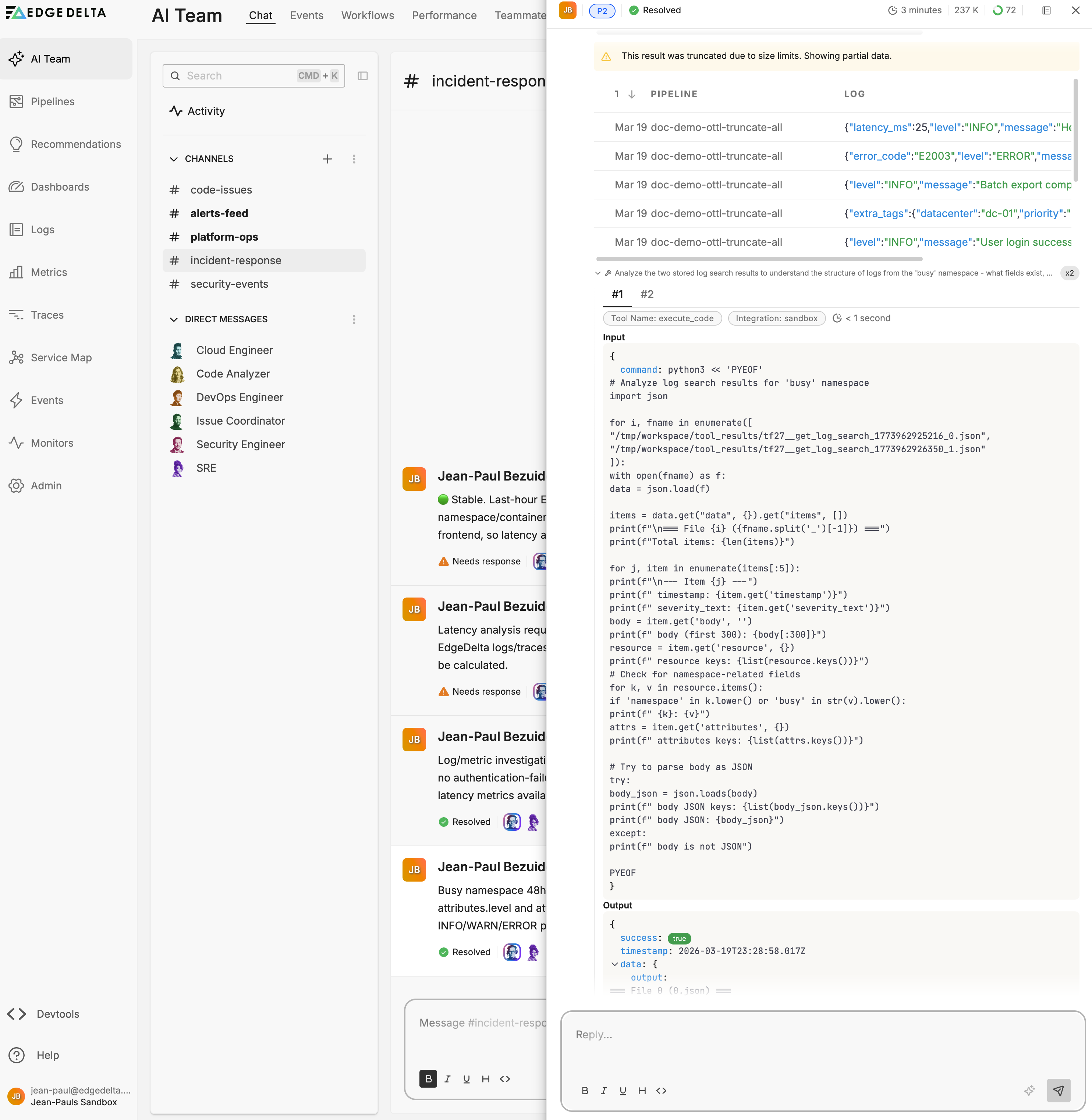
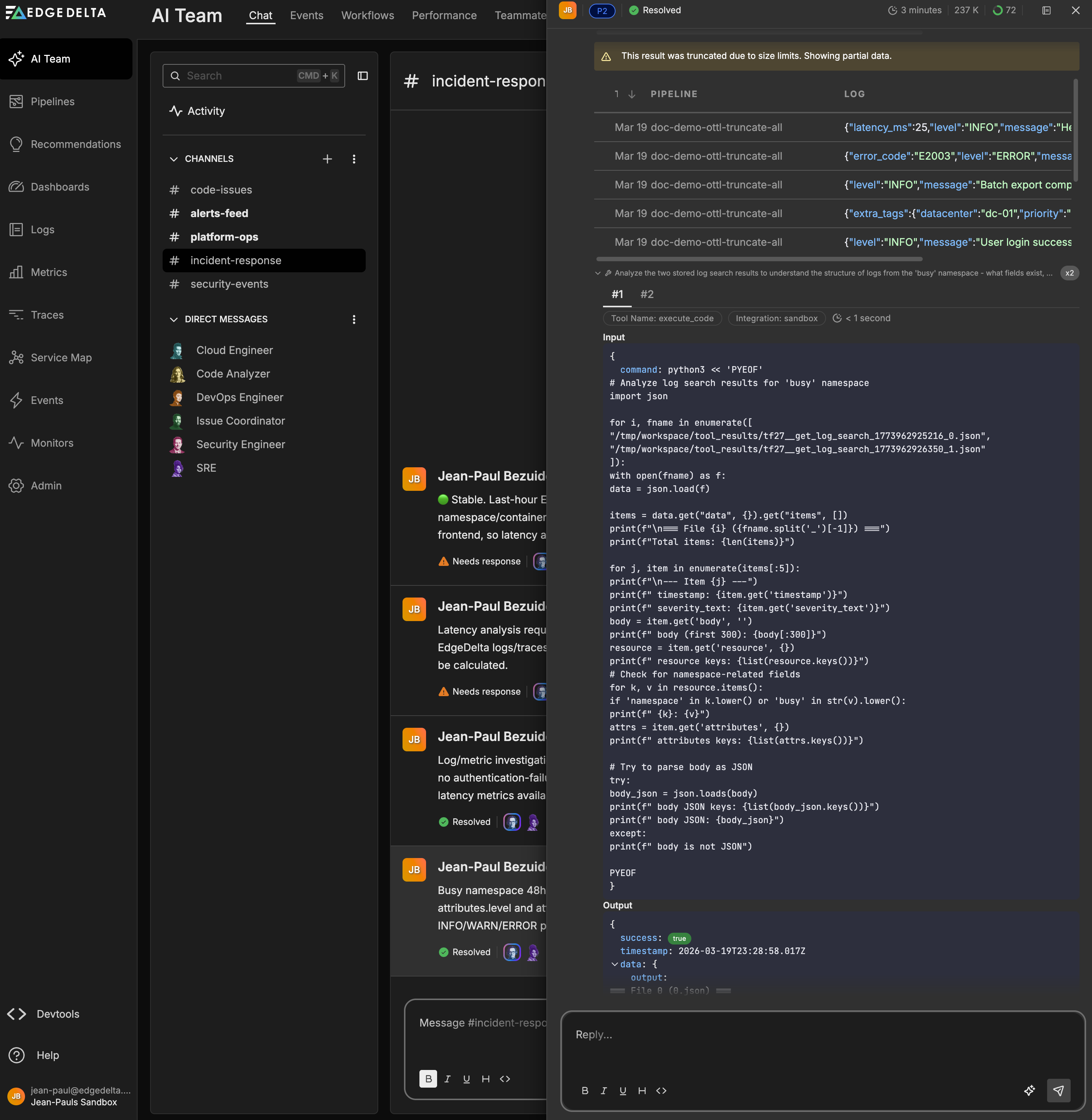
A user asks OnCall AI to search all logs from a Kubernetes namespace over the last 48 hours, group them by level and message type, and produce an hourly timeline for each group.
OnCall AI queries the logs and retrieves matching results. The dataset is too large for the context window, so the response is truncated. OnCall AI activates the sandbox and writes a Python script that:
- Loads the full log search results from the sandbox workspace
- Parses each JSON log body to extract the
levelandmessagefields - Groups logs by level and message type, computing counts and hourly buckets
The script output reveals the distribution across severity levels and identifies the peak activity window. OnCall AI synthesizes these results into a structured breakdown with counts, percentages, and an hourly timeline — analysis that would not have been possible from the truncated data alone.
Token efficiency
Without the sandbox, analyzing large datasets requires loading the full content into the model context window, where token consumption scales with data size.
The sandbox offloads data to a local file system. OnCall AI reads and processes files with scripts, sending only relevant findings back to the model. This substantially reduces token consumption for investigations involving large log volumes or verbose API responses.
The investigation depth setting controls how aggressively OnCall AI uses the sandbox for deep analysis versus summarized results. Deeper investigations produce more thorough findings but consume more tokens.
Token usage per thread is visible in channel thread details and tracked in Performance.
Error handling
The sandbox enables OnCall AI to handle errors programmatically rather than failing the investigation.
- Large responses. When an API response is too large for the context window, OnCall AI downloads it to disk and processes it with a script.
- Unreliable calls. If an external API is intermittent or rate-limited, OnCall AI writes retry logic instead of abandoning the query.
- Complex analysis. OnCall AI writes Python scripts to parse, filter, or summarize datasets before returning structured results to the model.
Memory in sandbox investigations
During sandbox investigations, OnCall AI surfaces stored knowledge from prior work.
- Organization-wide memories come from previous analysis findings. If OnCall AI has investigated a similar pattern before, it retrieves those findings to accelerate the current investigation.
- Personal memories reflect individual user preferences, such as preferred analysis approaches or prior decisions.
You can toggle organization-wide and personal memories independently and configure retention policies in Settings.
Security and isolation
Each investigation gets its own isolated code interpreter instance. Sandboxes do not share state between investigations. When the investigation completes, the sandbox is deprovisioned.
All actions within the sandbox follow the same permission controls as other teammate operations. For the full permission model, see Security Best Practices.
For details on data handling and AI model provider policies, see the Edge Delta Trust Center.
See also
- Specialized Teammates for pre-built teammates that use the sandbox
- Custom Teammates for building teammates with sandbox capabilities
- GitHub Connector for PR operations available to teammates
- Settings for memory retention and usage limits
- Security Best Practices for permission models and approval workflows