Ingest Data from Serverless AWS with Edge Delta
Deploy Edge Delta to monitor AWS serverless resources using Lambda Extension or Lambda Forwarder with Cloud pipelines.
4 minute read
Overview
Modern workloads in AWS are typically run partially or fully on AWS Lambda or AWS Fargate with ECS to benefit from serverless compute solutions. However, monitoring such solutions proves costly and inefficient. For example, many solutions use Lambda native integration with Amazon CloudWatch Logs, which in turn integrates with the customer’s centralized observability platform as follows:
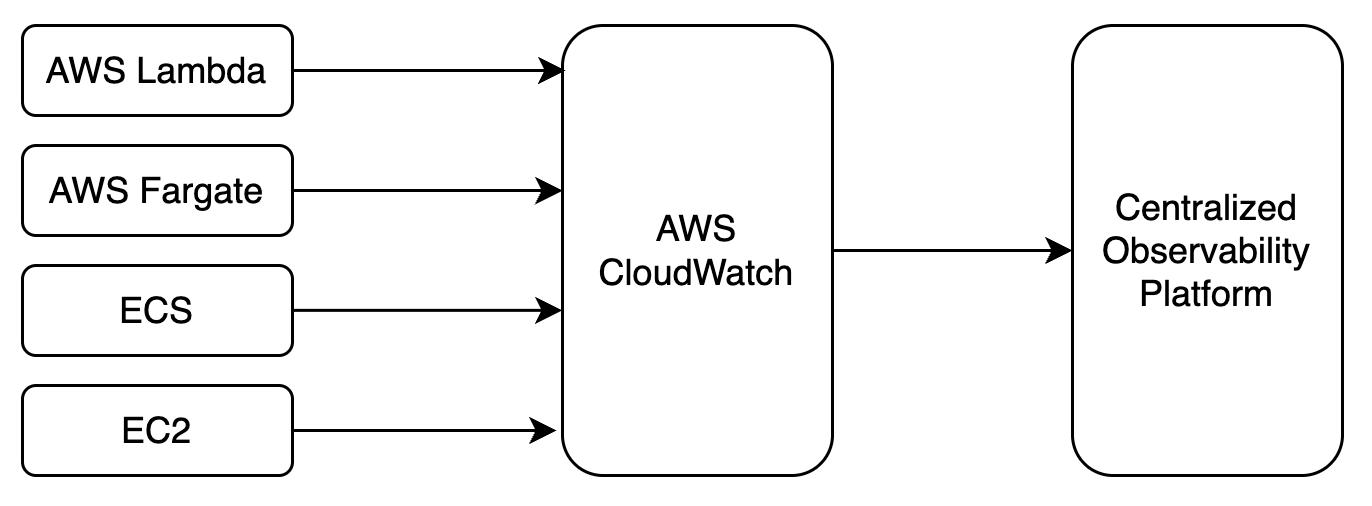
While it is easy to leverage native integrations, this solution becomes less suitable as the adoption of serverless architecture with event-driven data grows. In particular, ingesting high data volume into the centralized observability platform becomes expensive. In addition, observability is delayed as raw data needs to first be indexed centrally.
While the Edge Delta pipeline works well in a distributed host architecture it shouldn’t be used for external push-based sources, such as consuming Lambda function logs over HTTPS. In addition, regulatory requirements may preclude EC2 deployment of the Edge Delta pipeline in a distributed architecture pattern.
Edge Delta offers two solutions to these scenarios:
- Lambda Extension with a Cloud pipeline
- Lambda Forwarder with a Cloud pipeline
Why serverless monitoring matters
Serverless functions introduce observability challenges that traditional host-based monitoring does not cover:
- Cold starts affect tail latency. Cold starts occur in fewer than 1% of invocations under normal traffic, but they dominate p95 and p99 latency during traffic bursts when multiple execution environments initialize simultaneously. AWS now bills the initialization phase, so cold starts have both a latency and a cost impact.
- Log volume grows quickly. CloudWatch Logs charges per GB ingested. As you scale Lambda functions across environments, unfiltered log ingestion compounds cost. Setting environment-specific log levels (for example, ERROR-only in production) can reduce volume by 70-85%.
- Key metrics to monitor. Track invocation error rates (investigate if above 1%), p99 duration (investigate if above 3 seconds), cold start frequency, concurrency throttles, and memory usage. These metrics surface issues that individual log lines miss.
- Retention defaults are expensive. CloudWatch retains logs indefinitely by default. Set a retention policy (for example, 30 days) on each log group to prevent costs from compounding over time.
Edge Delta addresses these challenges by filtering, aggregating, and routing telemetry before it reaches your centralized observability platform, reducing ingestion volume while preserving the signals that matter.
Choose an approach
| Criterion | Lambda Extension | Lambda Forwarder |
|---|---|---|
| Use case | Monitor a Lambda function’s own logs | Forward CloudWatch logs from any AWS service |
| Deployment | Layer added to each Lambda function | Standalone Lambda subscribed to log groups |
| Log source | Lambda function runtime | CloudWatch log groups (Lambda, ECS, EC2, RDS, WAF, and others) |
| Batch size | 10 to 20 MB (higher throughput) | 200 to 300 KB per batch |
| Tag support | Lambda function tags | Resource tags for multiple AWS services |
| Pack | Lambda Pack | CloudWatch Pack |
Cloud Pipelines
Cloud pipelines are hosted in cloud infrastructure owned and managed by Edge Delta. See Cloud Pipelines. The Cloud pipeline can optionally output optimized data to a third party.
In Edge Delta testing, Cloud pipelines handled 60 Lambda instances producing approximately 6,000 lines (105 MB) of logs per minute. The default collective limit is 8 Cloud pipelines. These numbers may vary depending on log structure, batch size, and pipeline complexity.
Log batch size impacts Cloud pipeline performance and therefore the solution selection. A single Cloud pipeline processes 100 MB per minute if logs are batched and sent in batches of 10 to 20 MB. If batches are smaller (approximately 1 MB), it processes about 30 MB per minute. The Lambda Forwarder typically sends 200 to 300 KB per batch, resulting in approximately 10 MB per minute being processed by the Cloud pipeline.
Lambda Extension
The Lambda Extension monitors Lambda function logs directly, without routing through CloudWatch. It is deployed as a layer within your Lambda function and sends logs to the Cloud pipeline at the end of each function execution. It supports fetching AWS tags from the Lambda function and collects environment values such as runtime and architecture.
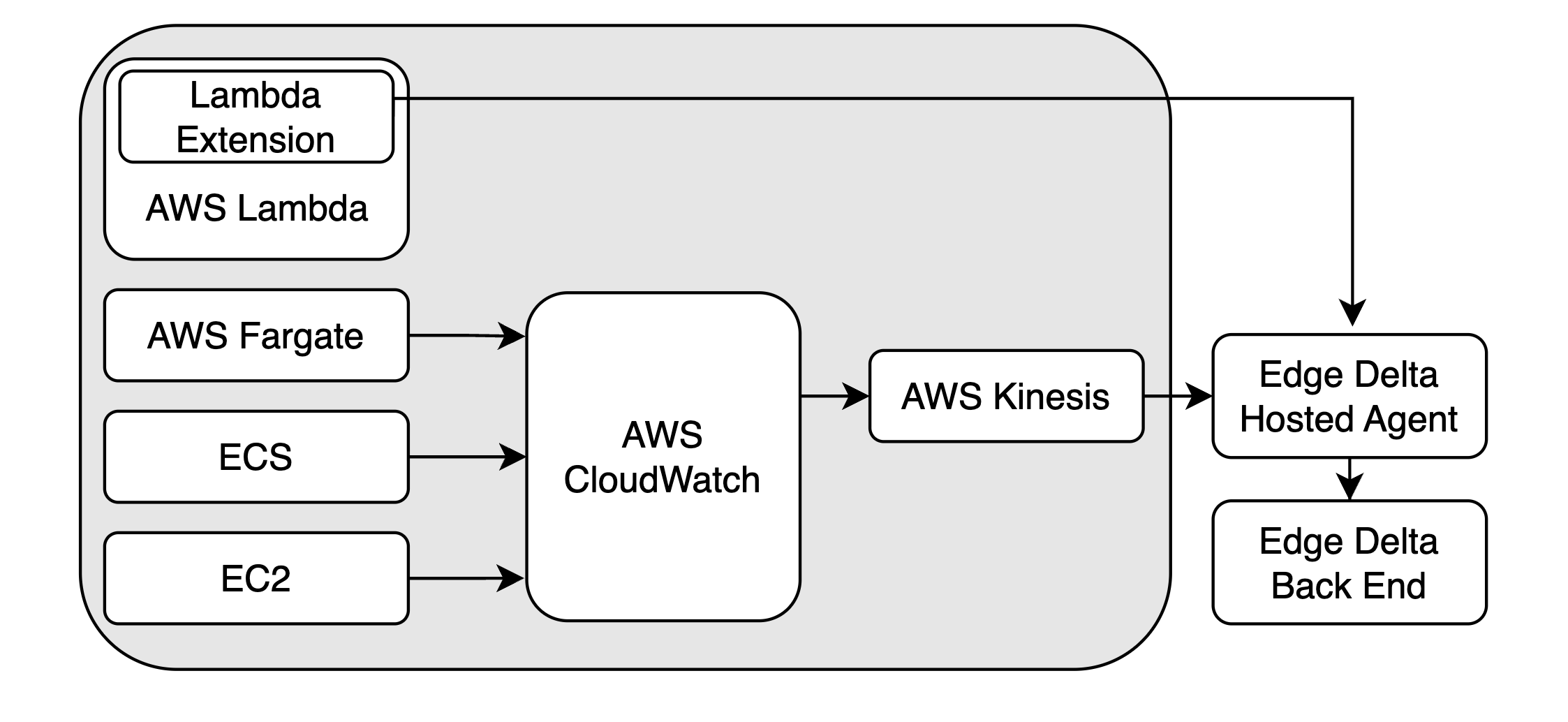
The Lambda Extension has been tested up to 20 MB of total logs per function instance execution and is fully scalable. Use the Lambda Pack to configure the Cloud pipeline for Extension log processing.
See Deploying the Lambda Extension for detailed instructions.
Lambda Forwarder
The Lambda Forwarder is a standalone Lambda function that collects logs from CloudWatch log groups and forwards them to a Cloud pipeline. Unlike the Extension, it works with CloudWatch logs from any AWS service, not just Lambda functions.
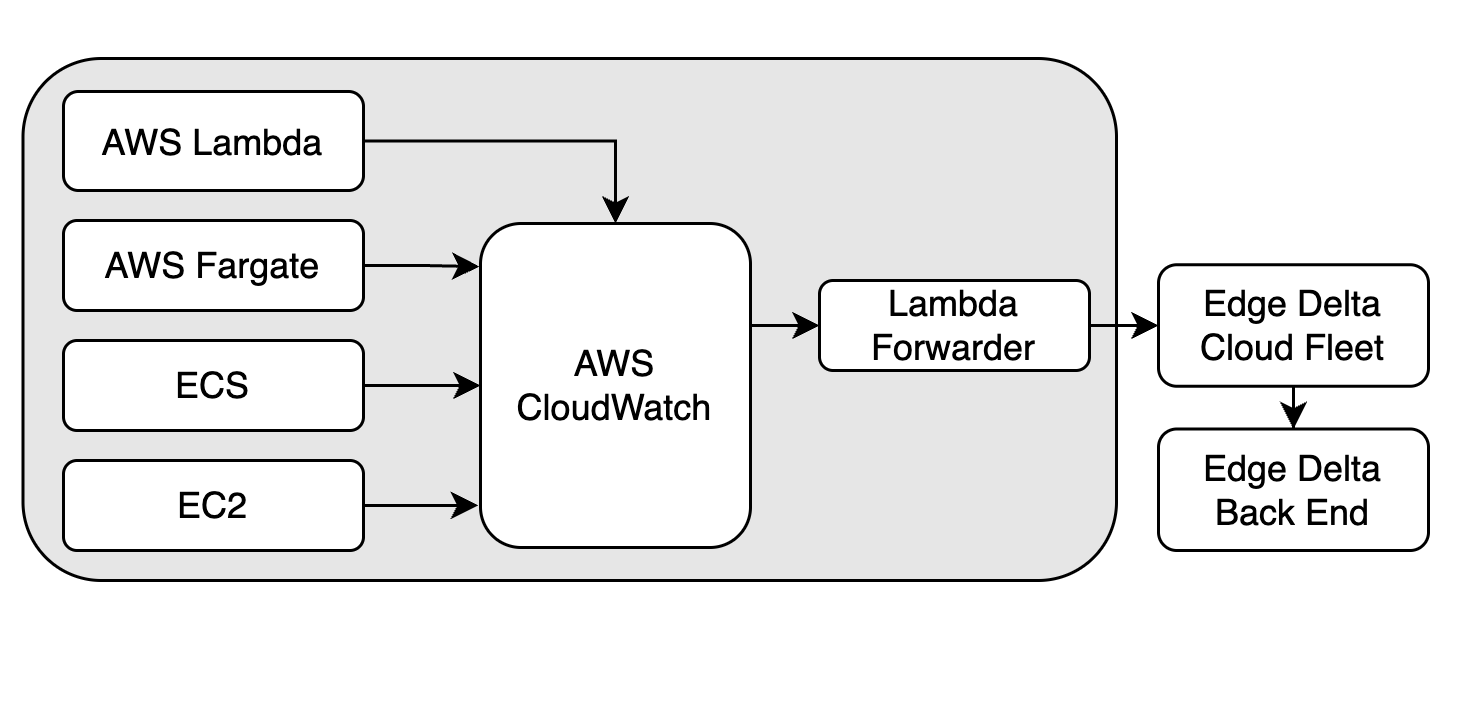
The Forwarder batches and sends logs from any configured log group. It supports fetching AWS tags for the following resources:
- Lambda
- Fargate
- ECS
- EC2
- SNS
- SageMaker
Additional services have experimental tag-fetching support, including RDS, API Gateway, EKS, CloudTrail, VPC Flow Logs, and others. See Deploying the Lambda Forwarder for the full list.
The Lambda Forwarder is fully scalable. Forwarder instances are invoked automatically by CloudWatch as needed and have been tested with 128 MB memory allocated. Use the CloudWatch Pack to configure the Cloud pipeline for Forwarder log processing.
See Deploying the Lambda Forwarder for detailed instructions.