Edge Delta Code Processor
8 minute read
Overview
The Code processor enables inline JavaScript execution for advanced data transformations in your pipelines. It provides a visual JavaScript editor where you can write familiar JavaScript code to transform telemetry data, with optional AI-assisted code generation.
Use the Code processor when you need:
- Complex conditional logic (if/else, switch statements)
- Array operations (map, filter, reduce)
- Nested object manipulation
- Multi-step computations
- Dynamic field creation
For simpler transformations, consider using dedicated processors like Add Field or Custom with OTTL statements.
Minimum Agent Version: v2.6.0
Configuration
Write JavaScript code in the editor to transform telemetry data. The processor automatically wraps your code in the edx_code() OTTL function.
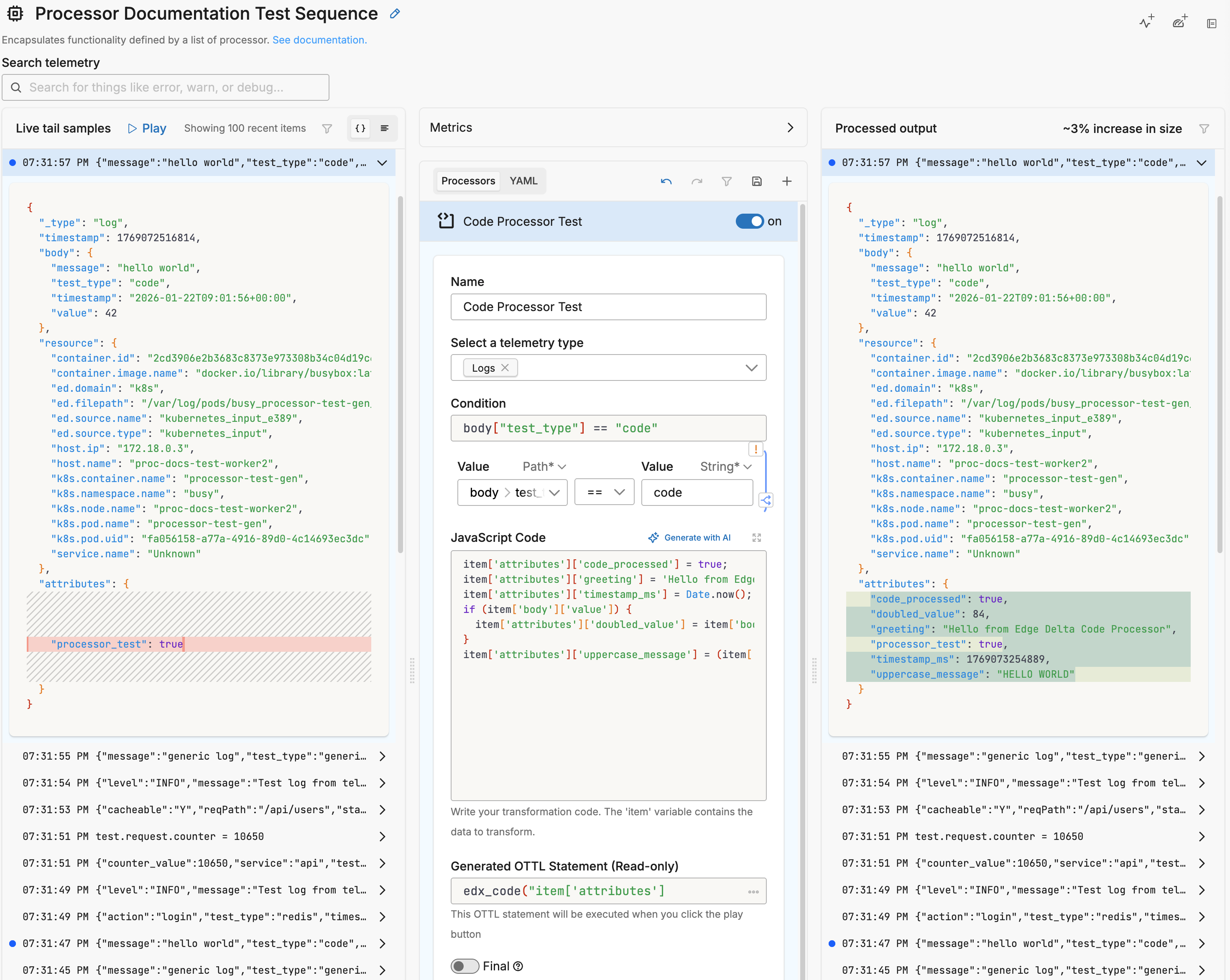
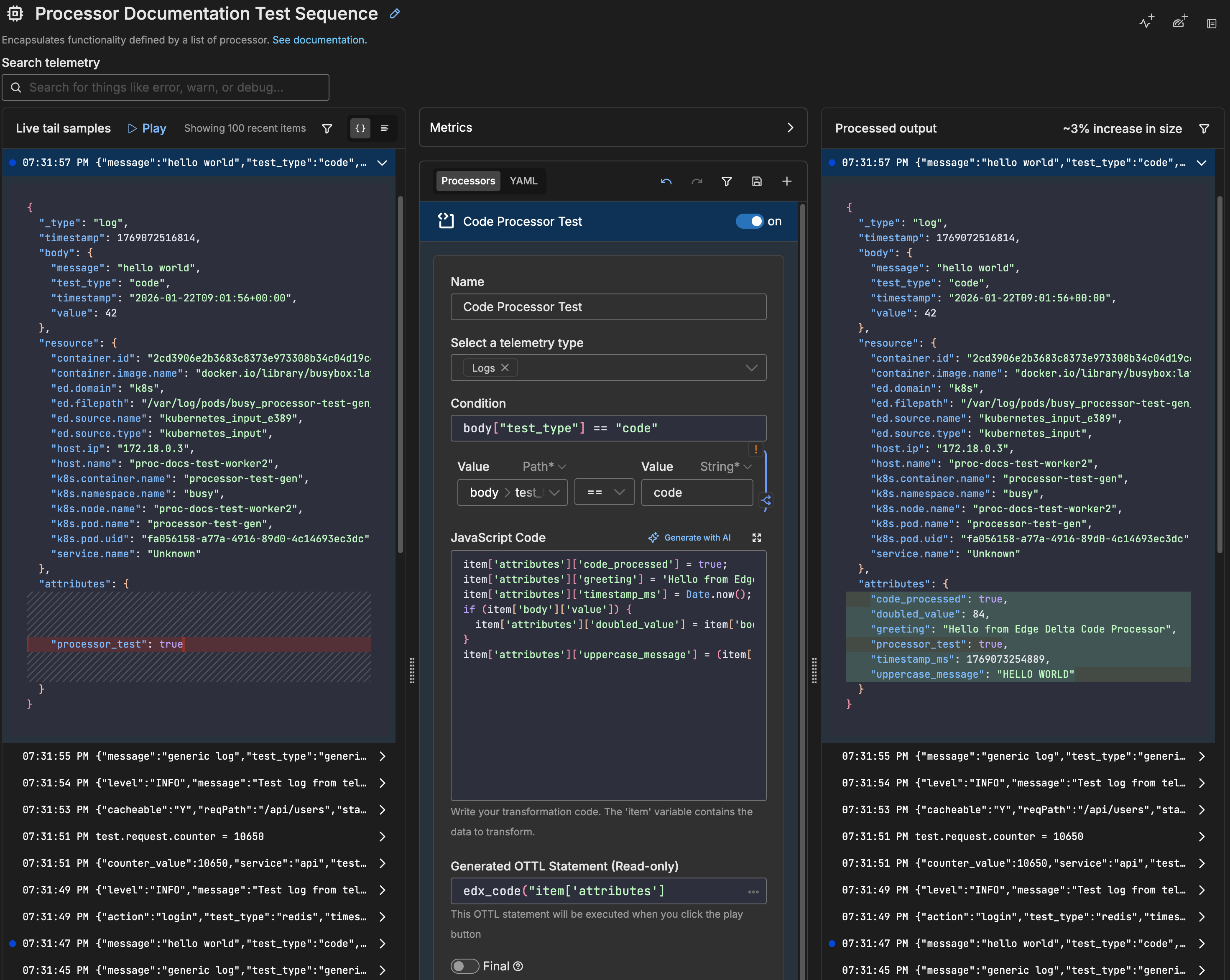
The JavaScript editor includes placeholder code to help you get started:
// JavaScript code to transform item
item.attributes["new_field"] = "Hello from Edge Delta";
item.timestamp = Date.now();
The generated OTTL statement appears in a read-only field below the editor:
edx_code("// JavaScript code to transform item\nitem.attributes[\"new_field\"] = \"Hello from Edge Delta\";\nitem.timestamp = Date.now();\n")
Generated YAML
- name: Multiprocessor
  type: sequence
  processors:
  - type: ottl_transform
    metadata: '{"id":"abc123","type":"code","name":"Code"}'
    data_types:
    - log
    statements: edx_code("item['attributes']['new_field'] = 'Hello from Edge Delta'; item['attributes']['timestamp'] = Date.now();")
Example: Categorize Logs by Severity
// Categorize logs based on error count
if (item['attributes']['error_count'] > 10) {
  item['attributes']['alert_level'] = 'critical';
  item['attributes']['notify'] = true;
} else if (item['attributes']['error_count'] > 5) {
  item['attributes']['alert_level'] = 'warning';
} else {
  item['attributes']['alert_level'] = 'normal';
}
Example: Extract and Transform Nested Data
// Parse nested JSON and flatten fields
let user = item['attributes']['user_data'];
item['attributes']['user_name'] = user['first'] + ' ' + user['last'];
item['attributes']['user_email'] = user['contact']['email'];
item['attributes']['user_tier'] = user['subscription']['tier'] || 'free';
Sample Input and Output
This example demonstrates the Code processor transforming a log with multiple JavaScript operations.
JavaScript Code:
item['attributes']['code_processed'] = true;
item['attributes']['greeting'] = 'Hello from Edge Delta Code Processor';
item['attributes']['timestamp_ms'] = Date.now();
if (item['body']['value']) {
  item['attributes']['doubled_value'] = item['body']['value'] * 2;
}
item['attributes']['uppercase_message'] = (item['body']['message'] || '').toUpperCase();
Generated YAML:
- type: ottl_transform
  metadata: '{"id":"code-test","type":"code","name":"Code Processor"}'
  condition: body["test_type"] == "code"
  data_types:
  - log
  statements: edx_code("item['attributes']['code_processed'] = true;\nitem['attributes']['greeting'] = 'Hello from Edge Delta Code Processor';\nitem['attributes']['timestamp_ms'] = Date.now();\nif (item['body']['value']) { \n  item['attributes']['doubled_value'] = item['body']['value'] * 2; \n}\nitem['attributes']['uppercase_message'] = (item['body']['message'] || '').toUpperCase();")
Sample Input:
{
  "_type": "log",
  "timestamp": 1769070471170,
  "body": {
    "test_type": "code",
    "message": "hello world",
    "value": 42,
    "timestamp": "2026-01-22T08:27:50+00:00"
  },
  "resource": {
    "k8s.namespace.name": "busy",
    "k8s.pod.name": "processor-test-gen"
  },
  "attributes": {}
}
Sample Output:
{
  "_type": "log",
  "timestamp": 1769070471170,
  "body": {
    "test_type": "code",
    "message": "hello world",
    "value": 42,
    "timestamp": "2026-01-22T08:27:50+00:00"
  },
  "resource": {
    "k8s.namespace.name": "busy",
    "k8s.pod.name": "processor-test-gen"
  },
  "attributes": {
    "code_processed": true,
    "doubled_value": 84,
    "greeting": "Hello from Edge Delta Code Processor",
    "timestamp_ms": 1769070471173,
    "uppercase_message": "HELLO WORLD"
  }
}
The processor added five new attributes:
code_processed: Boolean flag set totruedoubled_value: Original value (42) multiplied by 2 = 84greeting: Static string added by JavaScripttimestamp_ms: Current timestamp fromDate.now()uppercase_message: Original message converted to uppercase
Options
Select a telemetry type
You can specify, log, metric, trace or all. It is specified using the interface, which generates a YAML list item for you under the data_types parameter. This defines the data item types against which the processor must operate. If data_types is not specified, the default value is all. It is optional.
It is defined in YAML as follows:
- name: multiprocessor
  type: sequence
  processors:
  - type: <processor type>
    data_types:
    - log
Condition
The condition parameter contains a conditional phrase of an OTTL statement. It restricts operation of the processor to only data items where the condition is met. Those data items that do not match the condition are passed without processing. You configure it in the interface and an OTTL condition is generated. It is optional.
Important: All conditions must be written on a single line in YAML. Multi-line conditions are not supported.
Comparison Operators
| Operator | Name | Description | Example |
|---|---|---|---|
== | Equal to | Returns true if both values are exactly the same | attributes["status"] == "OK" |
!= | Not equal to | Returns true if the values are not the same | attributes["level"] != "debug" |
> | Greater than | Returns true if the left value is greater than the right | attributes["duration_ms"] > 1000 |
>= | Greater than or equal | Returns true if the left value is greater than or equal to the right | attributes["score"] >= 90 |
< | Less than | Returns true if the left value is less than the right | attributes["load"] < 0.75 |
<= | Less than or equal | Returns true if the left value is less than or equal to the right | attributes["retries"] <= 3 |
matches | Regex match | Returns true if the string matches a regular expression (generates IsMatch function) | IsMatch(attributes["name"], ".*\\.log$") |
Logical Operators
Important: Use lowercase and, or, not - uppercase operators will cause errors!
| Operator | Description | Example |
|---|---|---|
and | Both conditions must be true | attributes["level"] == "ERROR" and attributes["status"] >= 500 |
or | At least one condition must be true | attributes["log_type"] == "TRAFFIC" or attributes["log_type"] == "THREAT" |
not | Negates the condition | not IsMatch(attributes["path"], "^/health") |
Functions
| Function | Description | Example |
|---|---|---|
IsMatch | Returns true if string matches the regex pattern | IsMatch(attributes["message"], "ERROR\|FATAL") |
Field Existence Checks
| Check | Description | Example |
|---|---|---|
!= nil | Field exists (not null) | attributes["user_id"] != nil |
== nil | Field doesn’t exist | attributes["optional_field"] == nil |
!= "" | Field is not empty string | attributes["message"] != "" |
Common Examples
- name: _multiprocessor
  type: sequence
  processors:
  - type: <processor type>
    # Simple equality check
    condition: attributes["request"]["path"] == "/json/view"

  - type: <processor type>
    # Multiple values with OR
    condition: attributes["log_type"] == "TRAFFIC" or attributes["log_type"] == "THREAT"

  - type: <processor type>
    # Excluding multiple values (NOT equal to multiple values)
    condition: attributes["log_type"] != "TRAFFIC" and attributes["log_type"] != "THREAT"

  - type: <processor type>
    # Complex condition with AND/OR/NOT
    condition: (attributes["level"] == "ERROR" or attributes["level"] == "FATAL") and attributes["env"] != "test"

  - type: <processor type>
    # Field existence and value check
    condition: attributes["user_id"] != nil and attributes["user_id"] != ""

  - type: <processor type>
    # Regex matching on attributes
    condition: IsMatch(attributes["path"], "^/api/") and not IsMatch(attributes["path"], "^/api/health")

  - type: <processor type>
    # Regex matching on body (case-insensitive)
    condition: IsMatch(body, "(?i)error")
Common Mistakes to Avoid
# WRONG - Cannot use OR/AND with values directly
condition: attributes["log_type"] != "TRAFFIC" OR "THREAT"

# CORRECT - Must repeat the full comparison
condition: attributes["log_type"] != "TRAFFIC" and attributes["log_type"] != "THREAT"

# WRONG - Uppercase operators
condition: attributes["status"] == "error" AND attributes["level"] == "critical"

# CORRECT - Lowercase operators
condition: attributes["status"] == "error" and attributes["level"] == "critical"

# WRONG - Multi-line conditions
condition: |
  attributes["level"] == "ERROR" and
  attributes["status"] >= 500

# CORRECT - Single line (even if long)
condition: attributes["level"] == "ERROR" and attributes["status"] >= 500
JavaScript Code
Write JavaScript code to transform the telemetry data. Your code has access to the item object which represents the current data item.
Accessing Data:
| Path | Description |
|---|---|
item['attributes'] | Event attributes |
item['body'] | Raw log body |
item['resource'] | Resource attributes (host, service, k8s data) |
item['timestamp'] | Event timestamp |
Syntax Rules:
- Use bracket notation:
item['attributes']['field'] - Use single quotes inside brackets:
item['attributes'](not double quotes) - Do not use dot notation:
item.attributes.fieldis not supported
Supported Features:
- ES6+ syntax (arrow functions, template literals, const/let)
- Standard built-in objects (Math, Date, JSON, RegExp, Array, Object)
- Control flow (if/else, switch, for, while)
- Array methods (map, filter, reduce, forEach)
Generate with AI
Click Generate with AI to open a dialog where you can:
- Describe the transformation you need in natural language
- Paste a sample log for context
- Click Generate Code to create the JavaScript
The AI generates JavaScript code based on your description, which you can then review and modify.
OTTL Statement (Read-only)
Displays the generated edx_code() OTTL statement that will be executed. This field is read-only and updates automatically as you modify the JavaScript code.
Final
Determines whether successfully processed data items should continue through the remaining processors in the same processor stack. If final is set to true, data items output by this processor are not passed to subsequent processors within the node—they are instead emitted to downstream nodes in the pipeline (e.g., a destination). Failed items are always passed to the next processor, regardless of this setting.
The UI provides a slider to configure this setting. The default is false. It is defined in YAML as follows:
- name: multiprocessor
  type: sequence
  processors:
    - type: <processor type>
    final: true
JavaScript Sandbox
The Code processor executes JavaScript in a secure sandbox environment. The sandbox:
- Provides access to the
itemobject for data manipulation - Supports standard JavaScript built-in objects
- Isolates execution from the host system
- Does not allow network access or file system operations
For detailed information about sandbox capabilities and restrictions, see JavaScript Sandbox.
Performance Considerations
JavaScript execution adds overhead compared to native OTTL functions. For high-volume pipelines:
- Use OTTL functions for simple operations when possible
- Keep JavaScript code concise
- Avoid complex loops over large arrays
- Test performance with representative data volumes
See Performance & Limitations for detailed guidance.
See Also
edx_code Reference - Complete documentation for the edx_code function
Basic Operations - String, numeric, and boolean operations
Complex Transformations - Conditionals, nested objects, and arrays
Examples - End-to-end pipeline configurations
Troubleshooting - Common issues and solutions
Custom Processor - For raw OTTL statements without JavaScript