Install Browser RUM
8 minute read
Overview
You can install RUM two ways: a script tag that loads the SDK from Edge Delta’s CDN, or the @edgedelta/browser-rum npm package bundled into your application. Both behave identically at runtime and need only two values, an ingestion token and a service name. They differ in one thing: what happens to errors thrown before RUM is running.
| Script tag | Bundler (npm) | |
|---|---|---|
| Install | Save the loader file to your static assets | npm install @edgedelta/browser-rum |
| Errors thrown before your bundle loads | Captured | Lost, unless the Vite plugin adds the loader |
| Configuration source | Hand-written in the loader file | Resolved at build time from environment variables |
| Best for | Plain sites and any app whose HTML you control | Vite applications |
Prefer the script tag for a plain site or any app whose HTML you control. Prefer the npm package for a Vite app: its plugin emits the same early-error loader, so you give up nothing.
Prerequisites
Before installing, make sure you have the following:
- An Edge Delta ingestion pipeline. RUM sends data directly to the pipeline’s HTTP ingestion endpoints, so no agent is required.
- For the script tag: the ability to serve a static file from your own domain and edit the document
<head>. - For the npm package: a bundler. The build-time plugin supports Vite.
Get an ingestion token
The RUM token is the ingestion token of the pipeline that will receive the traffic:
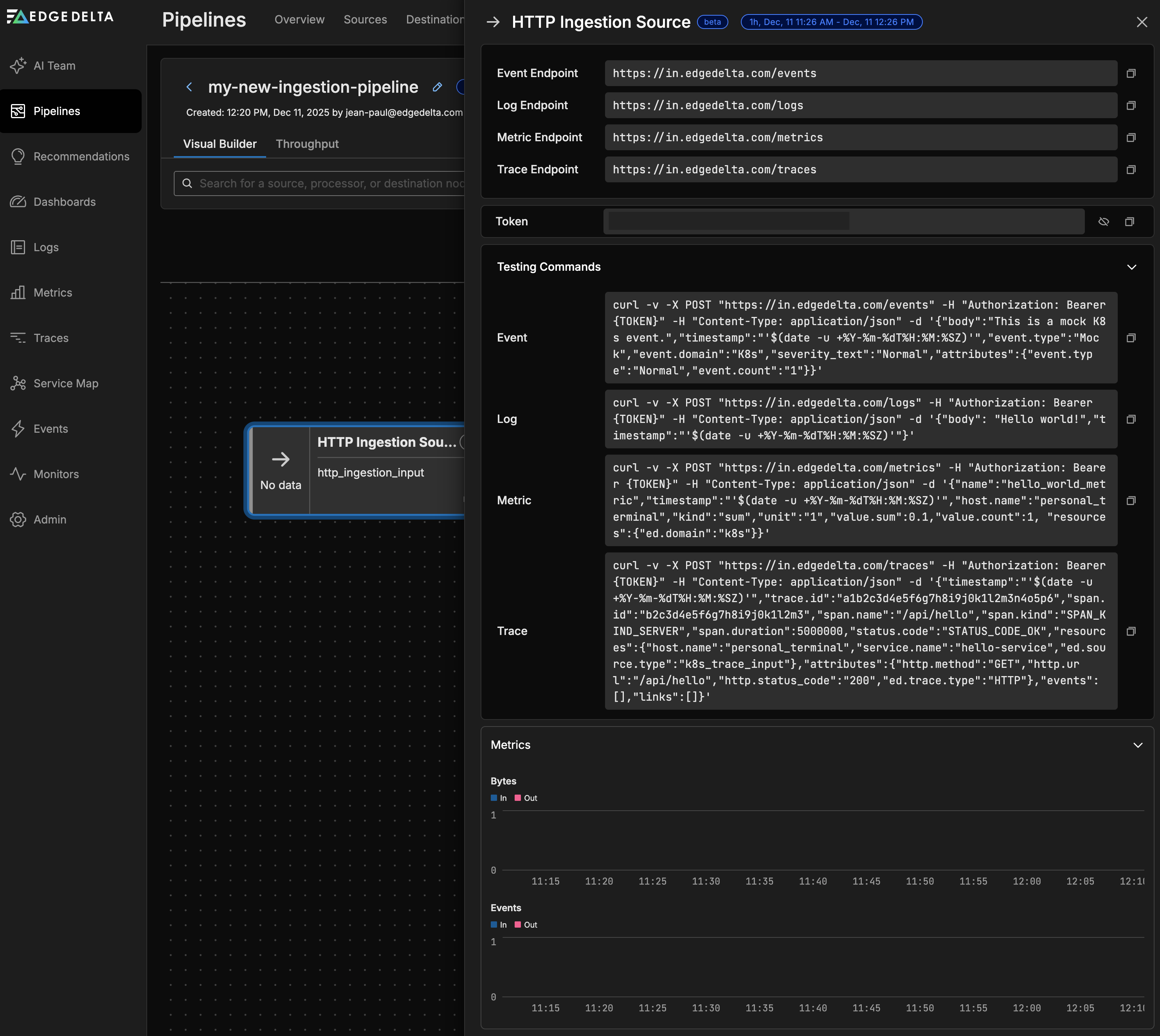
- Click Pipelines and create an ingestion pipeline, or open an existing one. See Ingestion Pipelines for the creation steps.
- Copy the ingestion token shown with the pipeline’s endpoints.

Note: The token is public by design. It ships in your page source and anyone can read it. That is expected: it grants nothing but the ability to send data. Lock it to your own sites with an origin allowlist (described in this topic) rather than trying to hide it. Never put an Edge Delta API token in a web page.
Install with a script tag
Serve the loader from your own domain
Save the following loader as a file wherever your site serves static assets, such as public/rum.js or static/rum.js, and replace YOUR_PUBLIC_TOKEN with your ingestion token and your-app with a name for this application:
"use strict";(function(){(function(t,d,u){var n=t.EdgeDelta=t.EdgeDelta||{};if(n.__loaded)return;n.__loaded=1,n.q=n.q||[],n.e=n.e||[];var l=20;function i(e,r,g){n.e.length<l&&n.e.push([String(e),String(r),g])}t.addEventListener("error",function(e){i(e.message,e.error&&e.error.name||"Error",e.error&&e.error.stack)}),t.addEventListener("unhandledrejection",function(e){var r=e.reason;i(r&&r.message?r.message:String(r),r&&r.name?r.name:"UnhandledRejection",r&&r.stack)});for(var c=["init","setContext","setUser","addError","addMessage","addBreadcrumb","startView","endView","flush","use"],o=0;o<c.length;o++)(function(e){n[e]=function(){n.q.push([e,[].slice.call(arguments)])}})(c[o]);var a=d.createElement("script");a.src=u,a.async=1,a.crossOrigin="anonymous";var s=d.getElementsByTagName("script")[0];s&&s.parentNode?s.parentNode.insertBefore(a,s):d.head.appendChild(a)})(window,document,"https://js.edgedelta.com/rum/v0.6.1/rum.min.js");})();
EdgeDelta.init({ token: "YOUR_PUBLIC_TOKEN", service: "your-app" });
Load it first in the head
Reference the file from <head>:
<!-- Edge Delta RUM -->
<script src="/rum.js"></script>
Three rules apply, and each one broken costs you the early-error window:
- No
async, nodefer, and nothing above it. The file installs error handlers and starts buffering synchronously, then loads the SDK bundle asynchronously so it never blocks rendering. Everything thrown before the bundle arrives is still captured, which is where the most interesting failures happen. - Do not paste the loader inline into the HTML. An inline script needs
'unsafe-inline'or its own hash in ascript-srcContent Security Policy, and HTML formatters such as Prettier reformat embedded scripts, which silently invalidates that hash and takes RUM down with no error anywhere. A same-origin file needs neither, andinitcan useRegExpand callback options there. - Keep
initout of application code. For a framework app the tag belongs in the HTML shell, such asindex.html,app.html, or the document template, not in a root component. In Next.js, useapp/layout.tsxwith<Script src="/rum.js" strategy="beforeInteractive">.
TypeScript for script-tag installs
Types are served beside the bundle at https://js.edgedelta.com/rum/v0.6.1/rum.d.ts. Save the file into the project and reference it once to type both EdgeDelta and window.EdgeDelta:
/// <reference path="./rum.d.ts" />
Install with npm
Install the package and call init from the first module your entry imports:
npm install @edgedelta/browser-rum
import { init } from "@edgedelta/browser-rum";

init({ token: "YOUR_PUBLIC_TOKEN", service: "acme-web", environment: "production" });
Everything after that point is covered. The gap is what the browser threw while your bundle was still being fetched and parsed, which no code inside that bundle can watch for itself. The Vite plugin closes that gap, and init picks up whatever it buffered.
The package has three subpath exports: /react, /vite, and /testing. The react and vite peer dependencies are optional, so installing the core alone pulls in nothing extra. See RUM Configuration and API for the React error reporting and testing helpers.
The Vite plugin
The @edgedelta/browser-rum/vite plugin does the two things that have to happen at build time:
// vite.config.ts
import { edgeDeltaRum } from "@edgedelta/browser-rum/vite";

export default defineConfig({
  plugins: [edgeDeltaRum({ config: { service: "acme-web" } })],
});
It resolves configuration from the environment and serves it as the virtual:edgedelta-rum module, so no variable names and no environment parsing reach the browser bundle:
import { rumConfig } from "virtual:edgedelta-rum";
if (rumConfig) init({ ...rumConfig, ignoreErrors: [/^ResizeObserver/] });
rumConfig is null whenever no token was configured. That is the off switch: nothing is injected and nothing is reported. For its type, reference the client types once from any file with /// <reference types="@edgedelta/browser-rum/vite-client" />.
It emits a small blocking script into <head> that buffers the errors thrown before your bundle runs and hands them to init. It replaces an <!--%EDGEDELTA_RUM%--> comment if the document has one and appends to <head> otherwise; pass placeholder to look for a different comment.
Environment variables
The plugin reads the following variables at build time. Anything the environment does not set falls back to the plugin’s config option, then to the SDK default. false and 0 read as off for the booleans:
| Variable | Config field |
|---|---|
VITE_RUM_TOKEN | token. Its absence turns everything off. |
VITE_RUM_SERVICE | service |
VITE_RUM_ENDPOINT | endpoint |
VITE_RUM_ENVIRONMENT, else VITE_STAGE | environment |
VITE_APP_VERSION | version |
VITE_RUM_SAMPLE_RATE | sampleRate |
VITE_RUM_REQUEST_SPANS | requestSpans |
VITE_RUM_NAVIGATION_SPANS | navigationSpans |
VITE_RUM_USE_BEACON | useBeacon |
VITE_RUM_DEBUG | debug |
VITE_RUM_PROPAGATE_TO, else the host of VITE_API_URL | propagateTo. A value of false disables propagation entirely. |
Loader modes
The loader option controls what the plugin puts in <head>:
loader | What lands in the head | Cost |
|---|---|---|
true (default) | A <script src> to a hashed same-origin asset | One extra request, cached forever, allowed by script-src 'self' |
'inline' | The loader source itself | No request; needs 'unsafe-inline' or a sha256- hash of those bytes in your CSP |
false | Nothing | No early-error buffer unless you serve LOADER_SOURCE yourself |
If your CSP uses a nonce instead of hashes, set Vite’s own html.cspNonce: Vite appends it to every script tag after plugins run, so the loader is covered in both modes with nothing to configure here. loader: false is for an app whose HTML is assembled outside Vite; you still get virtual:edgedelta-rum, and placing the loader is yours to do.
Verify the installation
Confirm data is flowing before rolling out further:
- Load your site in a browser and interact with the page.
- Switch tabs or close the page. The page load span is sent when the page is hidden, so a tab you never switch away from has not sent it yet.
- In the browser’s developer tools, confirm a
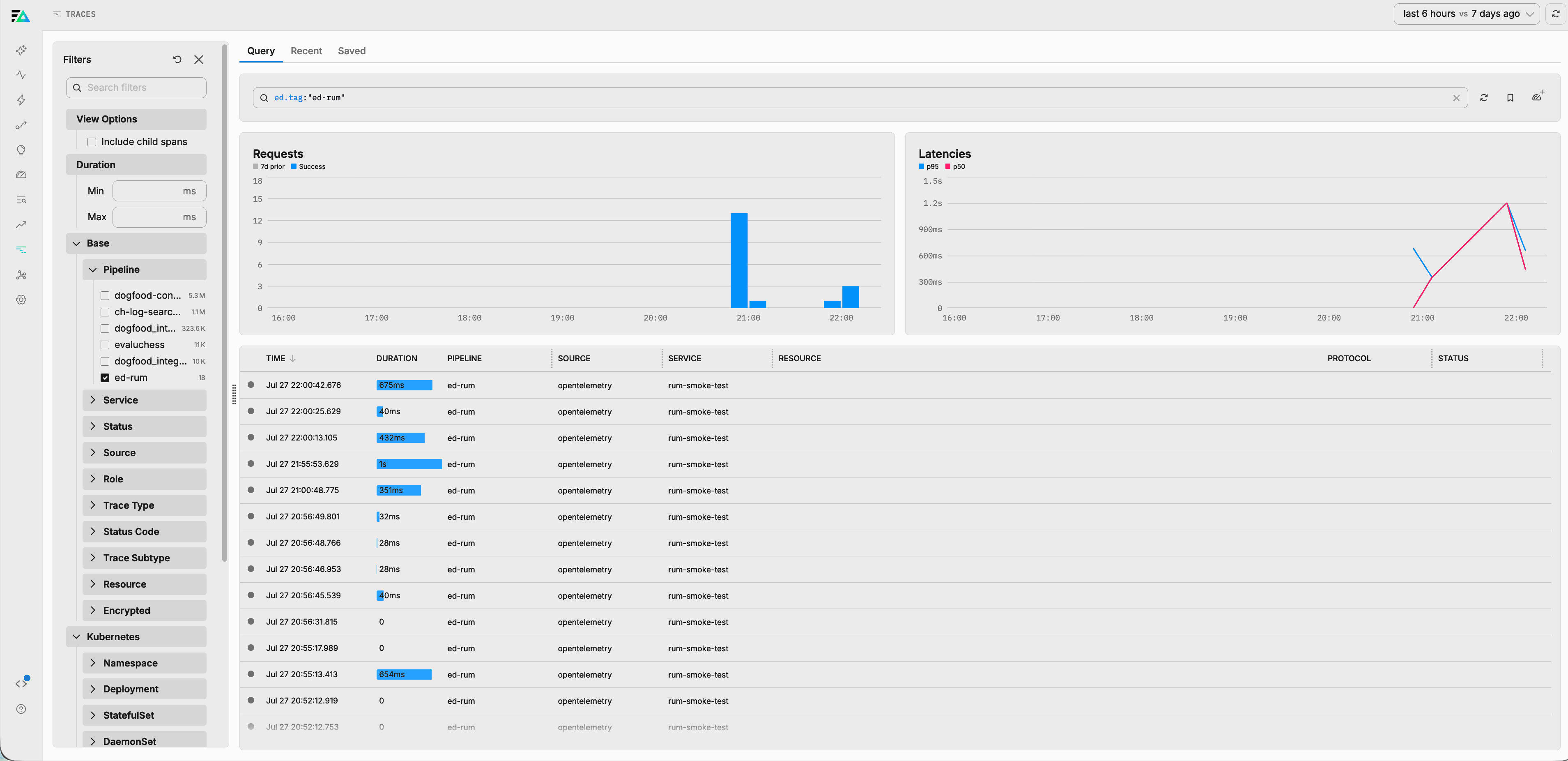
POSTto/otel/v1/tracessucceeded. Errors post to/otel/v1/logswithin a few seconds of being thrown. - In Edge Delta, open the Trace Explorer and filter for your
service.namevalue. Page views appear asdocumentLoadspans, and route changes in a single page application appear asrouteChangespans. Errors appear in Log Search.
Tip: Set
debug: true, or add aned_rum_debugkey to the browser’slocalStorage, to log the SDK’s whole pipeline to the console while you verify. See Troubleshooting RUM.
Restrict the token to your origins
Because the token is public, bind it to the origins that may use it. Set allowed_origins on the pipeline’s HTTP ingestion node so a copied token cannot be used from anywhere else:
nodes:
  - name: rum_ingest
    type: http_ingestion_input
    allowed_origins:
      - https://acme.com
      - https://*.acme.com
The matching rules are strict:
- A wildcard must be the whole leading host label.
https://*.acme.commatcheshttps://app.acme.comand nested subdomains such ashttps://a.b.acme.com, but not the apex domainhttps://acme.com(list it separately) and not lookalikes such ashttps://evilacme.com. - Schemes and ports must match exactly.
- An empty list means any origin is accepted.
Setting allowed_origins makes the token browser-only: requests without an Origin header are rejected, because that is what a stolen token replayed from a script or a server looks like.
Warning: Do not set
allowed_originson a node that also receives server-side traffic. Server requests carry noOriginheader and would be rejected. Use a separate ingestion node or pipeline for RUM.
Pin the bundle with Subresource Integrity
For script-tag installs, optionally add a Subresource Integrity (SRI) hash so the browser refuses the bundle if its bytes ever change. This prevents a compromised CDN from running new code on your pages.
Compute the hash of the exact file the loader fetches:
curl --fail -sS https://js.edgedelta.com/rum/v0.6.1/rum.min.js | openssl dgst -sha384 -binary | openssl base64 -A
Then edit the injected script inside the loader file. Change:
a.crossOrigin="anonymous"
to:
a.crossOrigin="anonymous",a.integrity="sha384-PASTE_HASH_HERE"
The variable prefix is whatever the loader names the script element, so keep the prefix already there. Published versions are immutable, so a hash stays valid for the life of the version you pinned.
Note: Only pin a fully versioned URL, such as one ending in
/rum/v0.6.1/. A rolling major-version URL deliberately serves a new build on every patch release, so a pinned hash would begin rejecting it and RUM would go silent with no warning.
After adding the hash, load the page and confirm rum.min.js fetched with status 200. A wrong hash makes the browser block the script entirely and log an SRI error to the console.
Content Security Policy
If the site sets a Content Security Policy, two directives matter:
| Directive | Needs |
|---|---|
script-src | https://js.edgedelta.com for the SDK bundle. The loader file is same-origin, so 'self' already covers it, which is the reason for not inlining it. |
connect-src | Your endpoint host. |
Either block shows up as a CSP violation in the browser console and as nothing at all in Edge Delta.
See Also
- Real User Monitoring - Overview of RUM concepts and architecture
- RUM Configuration and API - All SDK options, the API, React error reporting, and testing
- RUM Data Reference - Spans, error logs, sessions, and attributes
- Troubleshooting RUM - Diagnose missing or partial data
- Ingestion Pipelines - Create and manage the pipeline that receives RUM data