Multiple Matches with Append Mode
3 minute read
When to Use Multiple Matches
By default, the Lookup processor stops at the first matching row. Sometimes you want to collect all matching values—for example, applying multiple tags based on keywords found in a log message.
Use match_option: all (for contain, prefix, suffix modes) or regex_option: all (for regex mode) combined with append_mode: true to concatenate all matched values.
Example: Auto-Tagging Logs
Tag logs based on keywords they contain. A single log might mention multiple systems and should receive all relevant tags.
Lookup Table
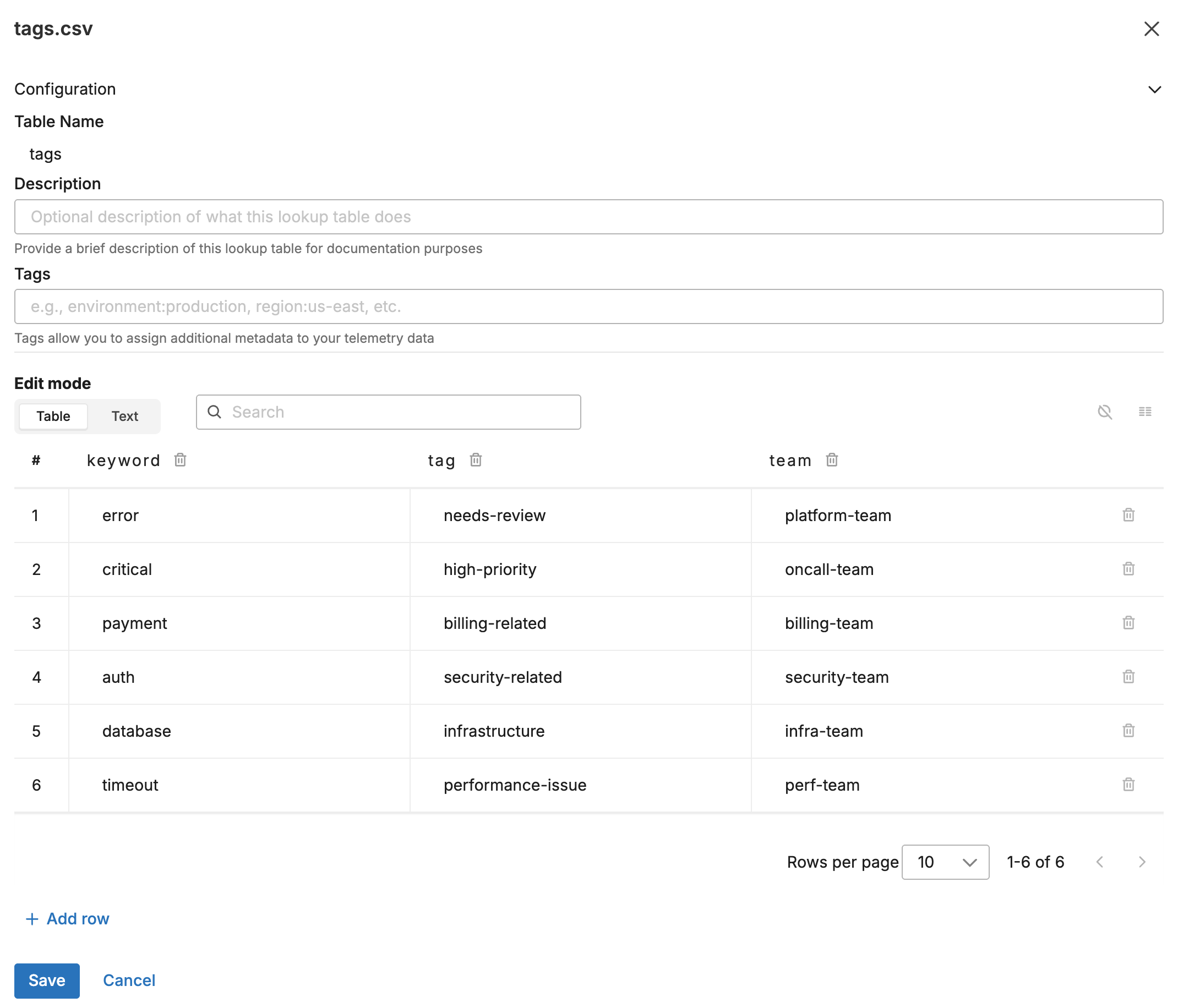
Upload this CSV to the Knowledge Library as tags.csv:
keyword,tag,team
error,needs-review,platform-team
critical,high-priority,oncall-team
payment,billing-related,billing-team
auth,security-related,security-team
database,infrastructure,infra-team
timeout,performance-issue,perf-team
The following screenshot shows the lookup table in the Knowledge Library.
Input Data
A log arrives that mentions multiple keywords:
{
  "body": "CRITICAL error in payment service: database connection timeout after 30s",
  "attributes": {}
}
This log contains: critical, error, payment, database, timeout
Configuration
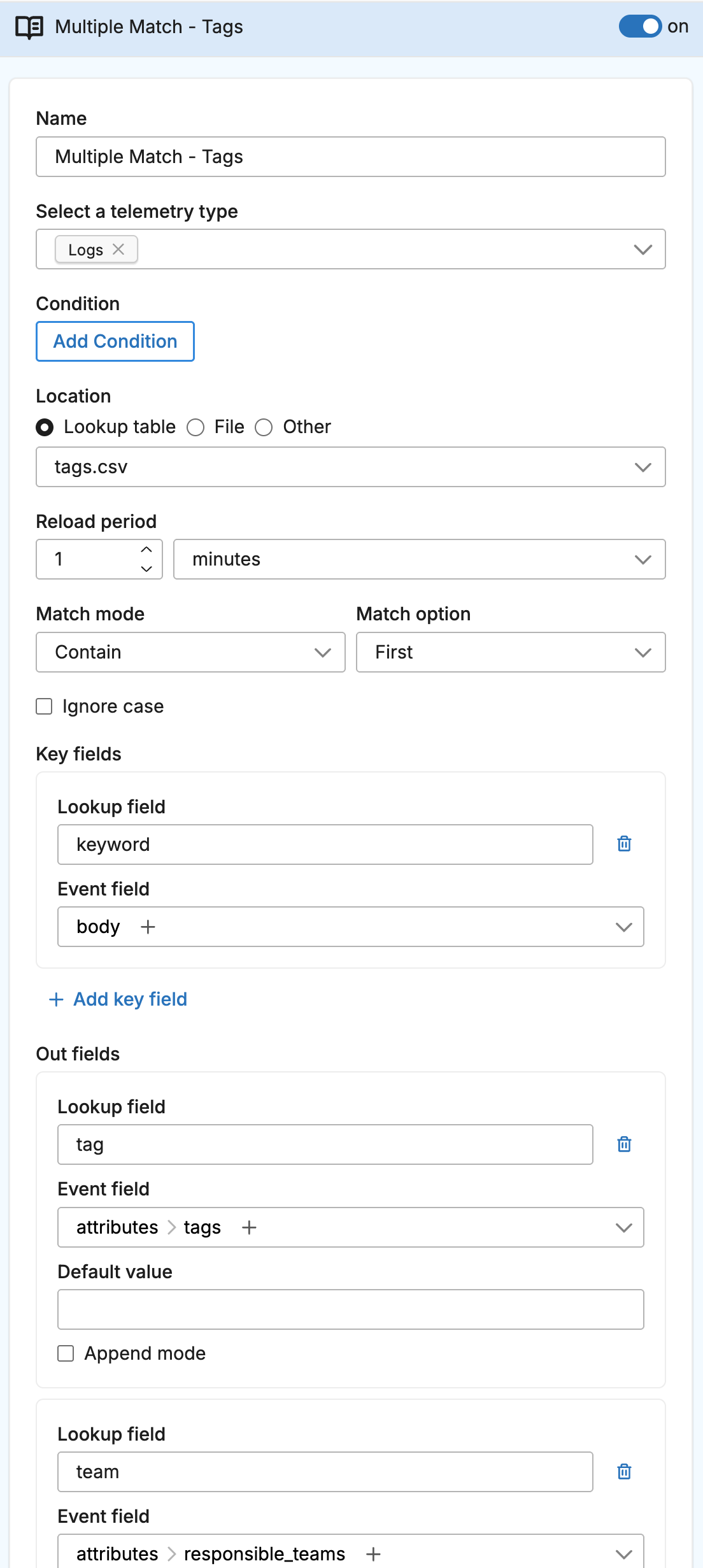
- name: multiple_match_lookup
  type: sequence
  user_description: Auto-Tagging
  processors:
  - type: lookup
    metadata: '{"id":"multiple-match-lookup","type":"lookup","name":"Multiple Match - Tags"}'
    data_types:
    - log
    location_path: ed://tags.csv
    reload_period: 1m0s
    match_mode: contain
    match_option: all
    key_fields:
    - event_field: body
      lookup_field: keyword
    out_fields:
    - event_field: attributes["tags"]
      lookup_field: tag
      append_mode: true
    - event_field: attributes["responsible_teams"]
      lookup_field: team
      append_mode: true
The following screenshot shows the lookup processor configured in a pipeline.
Output Data
With match_option: all and append_mode: true, all matching values are concatenated:
{
  "body": "CRITICAL error in payment service: database connection timeout after 30s",
  "attributes": {
    "tags": "needs-review,high-priority,billing-related,infrastructure,performance-issue",
    "responsible_teams": "platform-team,oncall-team,billing-team,infra-team,perf-team"
  }
}
Without these options (using default match_option: first), only the first match applies:
{
  "body": "CRITICAL error in payment service: database connection timeout after 30s",
  "attributes": {
    "tags": "needs-review",
    "responsible_teams": "platform-team"
  }
}
How Append Mode Works
When append_mode: true:
- The processor finds all matching rows (because
match_option: all) - For each
out_field, it collects the value from every matched row - Values are concatenated with commas into a single string
Without append_mode, only the first match’s value would be used, even with match_option: all.
Using with Regex Mode
For regex patterns, use regex_option: all instead of match_option: all:
- type: lookup
  name: Pattern-Based Tagging
  match_mode: regex
  regex_option: all
  key_fields:
  - event_field: body
    lookup_field: pattern
  out_fields:
  - event_field: attributes["matched_patterns"]
    lookup_field: pattern_name
    append_mode: true
Combining with Default Values
When using append_mode, default_value only applies if no matches are found:
out_fields:
- event_field: attributes["tags"]
  lookup_field: tag
  append_mode: true
  default_value: untagged
- If matches found:
tags: "needs-review,high-priority" - If no matches:
tags: "untagged"
Performance Considerations
Multiple match mode processes more data than single match:
- Every row in the lookup table is checked (not just until first match)
- More string concatenation operations
- Larger attribute values in output
For large lookup tables or high-volume data, consider whether you truly need all matches or if first-match behavior is sufficient.