Out-of-the-Box Loops
4 minute read
Overview
Edge Delta ships a set of loops out of the box that cover the checks most teams want running from day one. They are built from Edge Delta authored templates and activate themselves: when your organization has the connector a template needs, the template is instantiated as a live loop, runs once immediately, and then follows its trigger. You do not create or configure them.
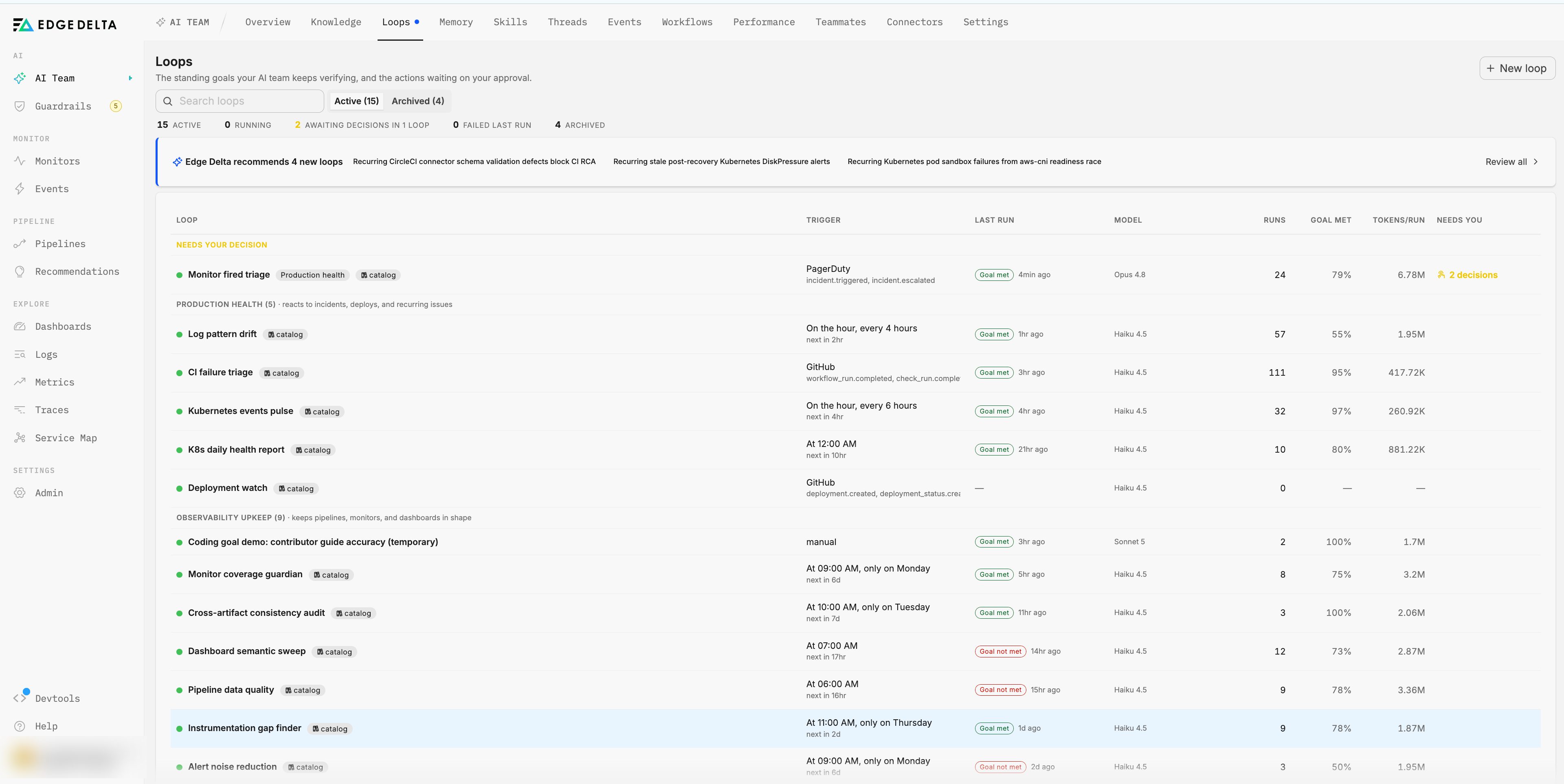
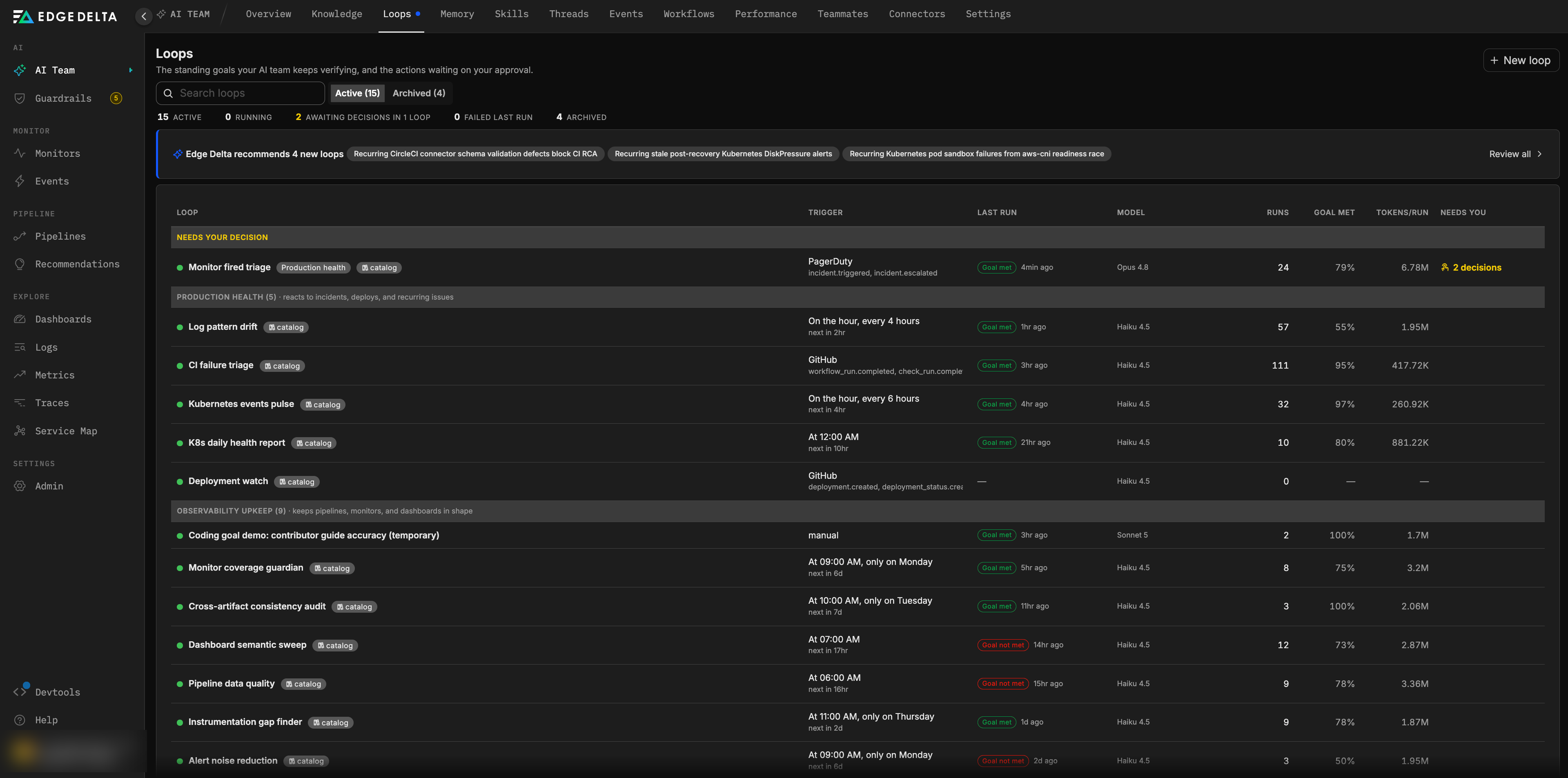
Out-of-the-box loops are recognizable on the Loops page by the catalog badge next to their name, which also names the template they came from, for example catalog: monitor-fired-triage. Their Overview shows Created by Edge Delta. Templates whose connector is not connected yet do not appear until you connect it, for example the GitHub templates appear once a GitHub connector exists.
To run the same check with a different shape, for example on another schedule or against a narrower scope, create your own loop from a goal as described in Creating and managing loops.
What they cover
The set of out-of-the-box loops changes over time as Edge Delta adds templates, so this page describes the ground they cover rather than listing each one. The Loops page always shows the current set for your organization, with the template name in each loop’s catalog badge.
Production health loops react to things that happen in production:
- Deployments. Each deployment is verified healthy within a fixed window after rollout, or flagged with evidence, with the result reported on the pull request that shipped it. Activated by a source-control connector such as GitHub.
- CI failures. Failed CI runs are classified as flake, infrastructure, or regression, with the failing job logs attached. Activated by a source-control connector.
- Fired monitors and paged incidents. Every page gets a scoped triage: symptom quantified, blast radius bounded, hypotheses ranked, and a mitigation proposed or explicitly deferred, with progress posted back to the incident. Activated by an incident management connector such as PagerDuty. This is the one out-of-the-box loop that runs on the
criticaltier. - Cluster health. Scheduled pulses and daily reports on Kubernetes warning events, failing workloads, and pending recoveries, with real counts compared across windows.
- Log pattern drift. New and surging error signatures are diffed against a fingerprint of the previous run and reported with a sample line, a volume, and an owner.
Observability upkeep loops keep your Edge Delta estate in shape on a schedule:
- Monitor coverage and noise. Critical entities in the knowledge graph get monitor coverage or a coverage proposal with backtest evidence, and noisy monitors are retuned or their noise is recorded as legitimate.
- Dashboards. Every widget query is re-executed, and empty or broken widgets get a diagnosed fix proposal.
- Pipelines. Streams are profiled and quality gaps get processor proposals with before and after evidence, and monitors, dashboards, and pipelines are audited for consistency with each other and with live telemetry.
- Knowledge and instrumentation. Incident-prone services without runbooks or documentation, duplicate graph nodes, and entities with incident history but no matching telemetry are surfaced as a prioritized backlog or an instrumentation proposal routed to the owning team.
- Teammate tuning. Teammate outcomes are reviewed weekly, with prompt improvements proposed from cited thread evidence.
Out-of-the-box loops run on the routine tier unless noted above. Schedules are in UTC. Loops that sweep a large estate run with longer duration budgets than the default.
Loops activated by Edge Delta telemetry become eligible once the Edge Delta MCP connector is available in your organization. Event-driven loops appear when the connector that emits their events is connected.
Data readiness
A template that needs data your organization does not have yet is created paused with the badge waiting for data, and the reason is spelled out on the loop, for example “0 events in the last 24h (needs 1)” or “3 customer-created monitors (needs 1).” Readiness conditions include:
- Logs ingested within a lookback window.
- Kubernetes events within a lookback window.
- At least one customer-created monitor or dashboard, beyond the defaults seeded into every organization.
- Recent activity between people and user-editable teammates, for the prompt tuning template.
- A specific connector type connected.
Edge Delta re-checks readiness hourly. When the conditions are met, the loop activates itself and its Overview notes “Activated: data readiness conditions met.” You do not need to resume it by hand.
Managing out-of-the-box loops
Out-of-the-box loops behave like any other loop once created. You can pause, resume, edit, or delete them, change their surfaces, and add skills. Editing the goal or prompt does not detach the loop from its template, and a deleted out-of-the-box loop is not recreated automatically.
If an out-of-the-box loop depends on a connector you later remove, the loop is paused with the reason recorded. It does not resume automatically when the connector returns.
Next steps
- Anatomy of a loop for the parts a template fills in.
- Skills for the procedures out-of-the-box loops follow.
- Connectors to connect the systems that activate event templates.