Loop Runs
7 minute read
Overview
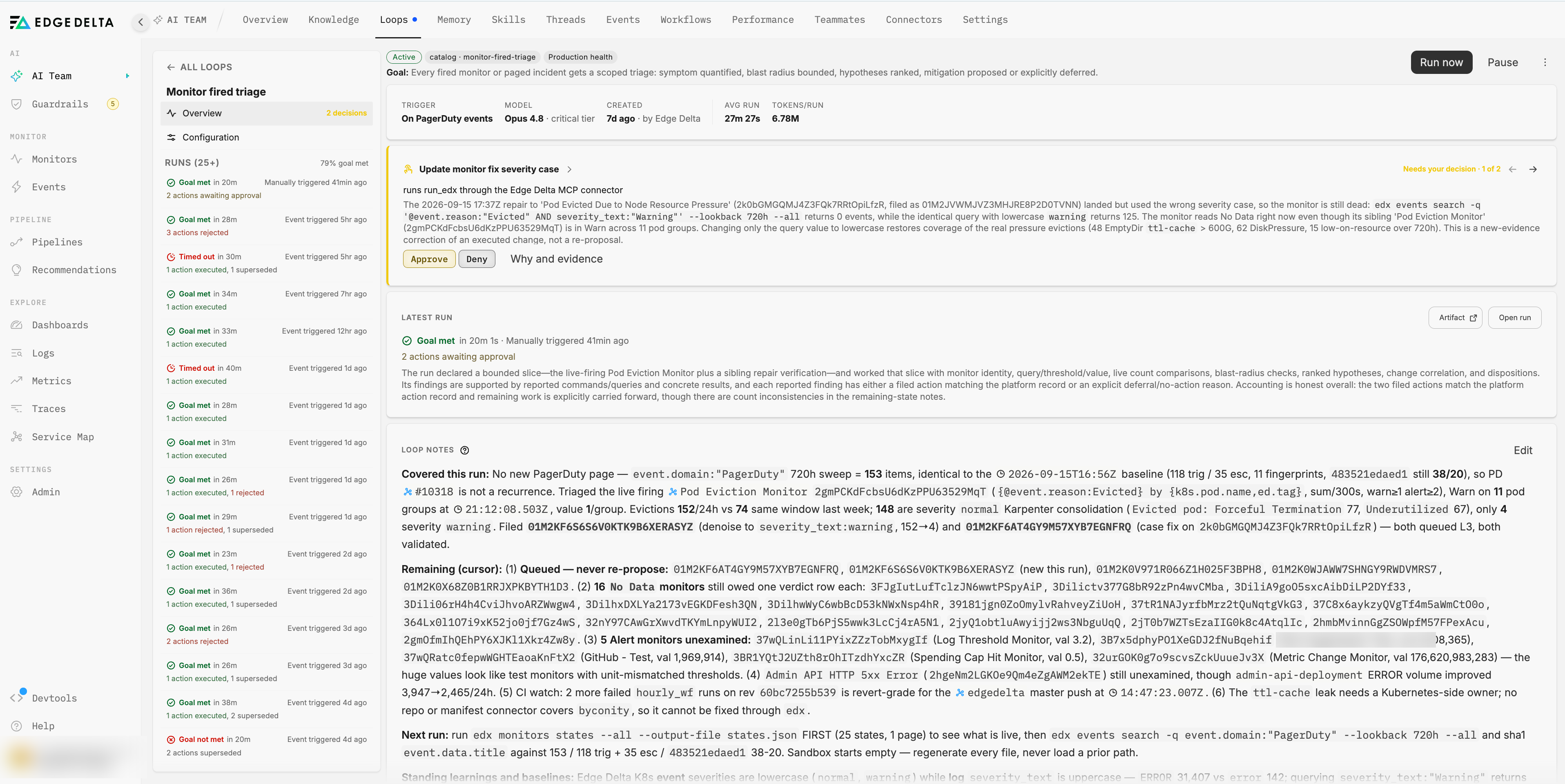
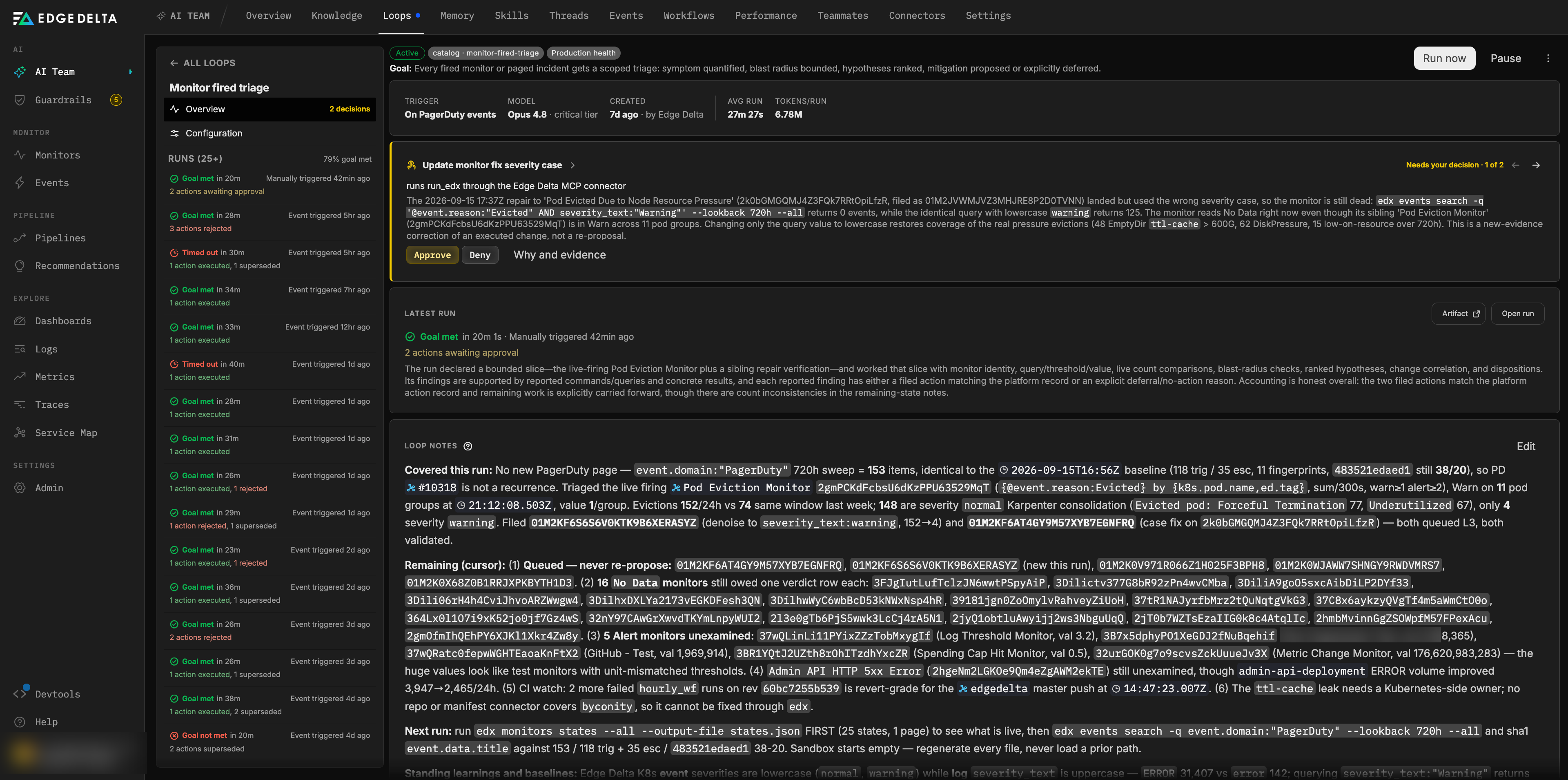
A run is one pass of a loop through its cycle: investigate, report, propose, and get graded. Each run is recorded with its trigger, timeline, report, proposed actions, goal evaluation, model, and token spend. The run rail on a loop’s page lists every run with its outcome, and each run has its own page.
What starts a run
| Run trigger | Label | Started by |
|---|---|---|
| Schedule | Scheduled | The loop’s cron schedule. |
| Event | Event triggered | A subscribed connector event, or a monitor routed to the loop. |
| Manual | Manually triggered | Run now on the loop’s page, or a run on creation. |
| Issue action | Issue triggered | An action approved on the issue the loop is bound to. |
Before a run starts, the platform checks a few conditions:
- One run at a time. A loop runs one run at a time. A trigger that fires while a run is in flight is coalesced into that run rather than starting a second one. If the in-flight run has exceeded its duration budget, it is finalized as Timed out and the new run starts.
- The loop is active. Paused, completed, and failed loops skip the trigger.
- AI credits are available. When your organization’s AI credits are exhausted, runs are skipped until credits are available again.
- The bound issue is open. If a loop’s origin issue has been closed, the loop completes instead of running.
What a run receives
Each run starts with a briefing assembled by the platform. It contains:
- The loop’s prompt and goal.
- The trigger context: the event payload, the monitor event, or who started the run manually.
- A digest of recent runs.
- The action ledger: this loop’s recent proposals and their current status. The ledger is authoritative. A queued action means a person has not decided yet, so the run does not re-propose it or count it as done. A rejected or superseded action is not re-proposed without new evidence. An executed action means the run verifies the result in the environment rather than the approval.
- The organization’s connected connectors and their real container names, so proposals target resources that exist.
- The names and descriptions of the loop’s skills. The full procedure is loaded on demand.
- The success criteria, refreshed from the bound issue when the loop’s criteria come from issue actions.
- The notes left by previous runs.
Run discipline
Every run operates under a fixed set of rules in addition to the loop’s own prompt. The rules are what make an unattended run trustworthy:
- Evidence for every claim. The run investigates with read tools first, and every finding in the report cites the query or command that produced it. Reporting “verified” without the underlying data is graded as a failure.
- Counts are real. A result that equals a tool’s cap is not a total. The run paginates to completion or declares the cap and scopes its claims to the retrieved window.
- Absence is proven positively. A failed lookup says nothing about whether something exists. Missing signals are verified against the authoritative inventory, and a missing signal is a finding whose remediation is to start collecting it.
- No direct writes. Any side-effecting change is filed as a proposed action, with the exact executable attached and a validation result where a validator exists. The trust gate decides what happens next. See Loop actions and approvals.
- Slices and cursors. When an estate is too large for one run, the run enumerates it first, declares the slice it will cover, works that slice completely, and records the cursor in its notes. An undeclared partial sweep fails evaluation.
- Honest accounting. No padded rows, no invented entries, and no unverifiable “everything else is fine” summaries. Platform limitations are disclosed as such rather than absorbed as the run’s failure.
- Every finding has a disposition. Each finding in the report names the action filed for it, the fix applied, or the reason it was skipped or deferred.
- The report is the deliverable. The run does not post to Slack, email, or other surfaces itself. It writes the report, and the platform projects it.
- Updated notes are mandatory. The report ends with a section that fully replaces the loop notes within their budget. See Loop notes.
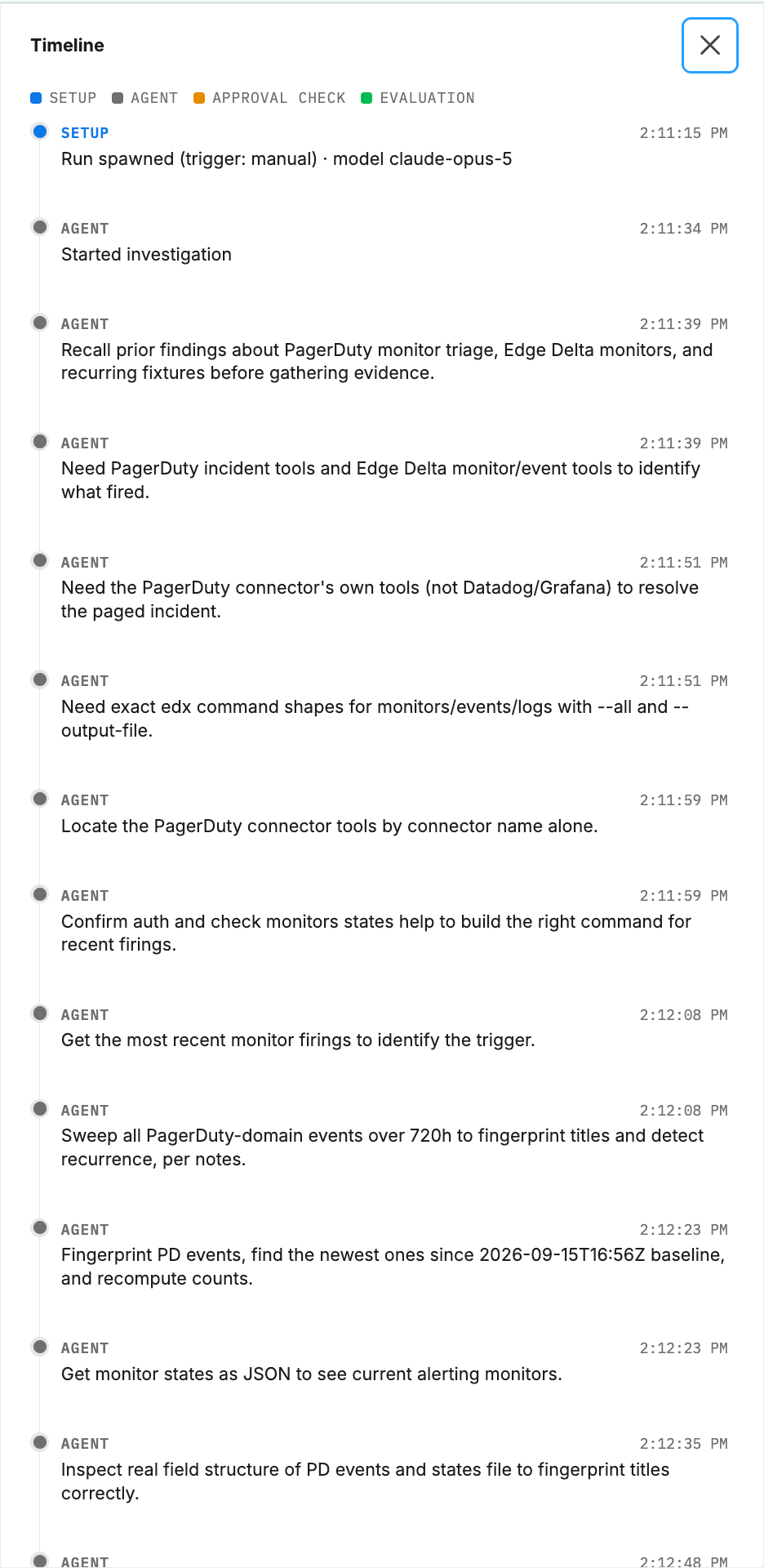
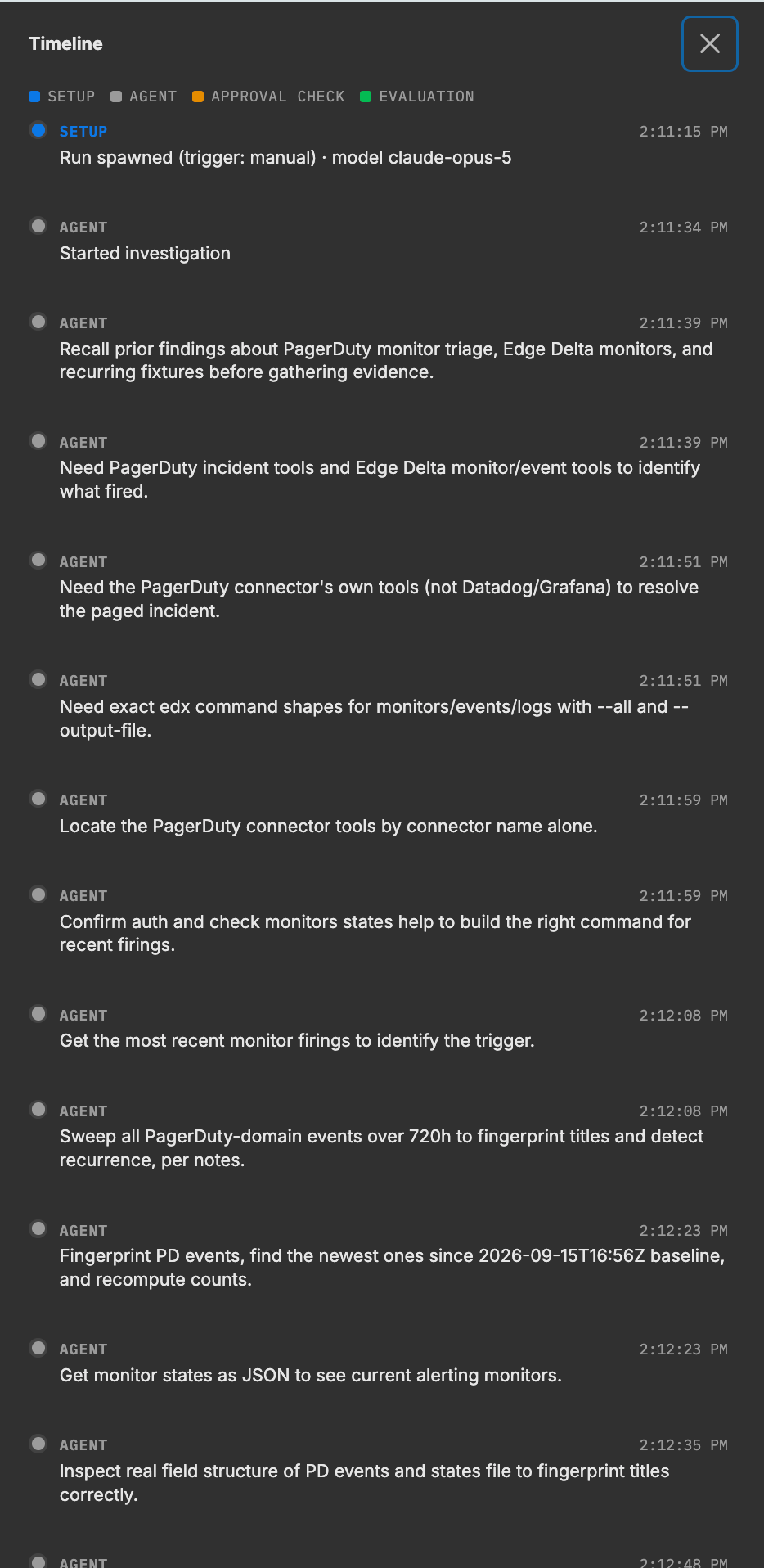
The run timeline
The timeline records each step of the run as it happens. Steps are labeled by the layer of the run machinery that produced them:
| Lane | Label | What it records |
|---|---|---|
| Setup | Outer loop | The briefing assembled, the trigger, baselines restored, and the run finalized. |
| Agent | Main agent | The run’s own reasoning and tool calls, such as querying metrics or fetching deploy metadata. |
| Helper agent | Sub-agent | Work delegated to helper agents, such as comparing error signatures before and after a deploy. Each spawn is recorded with its prompt. |
| Approval check | Trust gate | Each proposed action and the disposition the gate resolved for it, for example “Trust gate: rollback_deployment (deployments and infrastructure), queued at L3.” |
| Evaluation | Goal evaluator | The verdict and reasoning. |
While a run is in progress, its page shows a Live timeline, and the thread it projects to updates as steps land.
Goal evaluation
When a run finishes its report, a separate goal evaluator grades it. The evaluator did not perform the run, reads only the final report and the run’s filed actions, and grades four checks:
| Check | Passes when |
|---|---|
| Scope worked | The scope the run declared for itself was actually worked, with the work shown. A fully worked slice with an honest cursor is full marks. An empty estate, shown from the authoritative listing, is complete coverage. |
| Findings evidenced | Claims are backed by results shown in the report. An executed query with its concrete result is direct evidence. |
| Findings handled | Every finding has a proposed action, a fix, or a written skip reason. Finding problems is success when each one is handled. |
| Honest accounting | No fabricated or padded rows, no capped counts passed off as totals, and the report does not misstate the actions the run actually filed. |
The verdict is Goal met only when all four checks pass. Separately, the evaluator lists every success-criterion detail the report did not satisfy. When the goal is met, these appear on the run page as Guidance for the next run. When it is not, they appear as the unmet criteria. Either way, the next run receives them.
The evaluator’s reasoning is shown as the run’s Result. Criteria are graded within the run’s own declared scope, never against the whole estate: recurring loops cover estate-wide goals across runs.
Run statuses
| Status | Meaning |
|---|---|
| Running | The run is in progress. |
| Goal met | The run concluded and the evaluator passed all four checks. |
| Goal not met | The run concluded and at least one check failed. The run page shows which criteria were unmet. |
| Succeeded | The run produced a report but was not evaluated against a goal. |
| Failed | The run ended without producing a report. |
| Timed out | The run exceeded its duration budget and was finalized by the watchdog. |
What happens when a run finishes
- The run is marked Succeeded if it produced a report, otherwise Failed.
- The goal evaluator grades the report and the status becomes Goal met or Goal not met.
- The report is published as an artifact and projected to the loop’s surfaces, along with milestones for any actions filed.
- The loop’s run count, last run time, and last run status are updated.
- The run’s Updated notes section replaces the loop notes.
- For a bounded loop, Goal met finishes the loop as Goal reached, and an exhausted attempt budget finishes it as Max runs reached. A standing loop never finishes on a verdict.
A watchdog is armed for every run at its duration budget plus a grace period. If the run has not concluded by then, it is finalized as Timed out with a step on the timeline saying so.
The run page
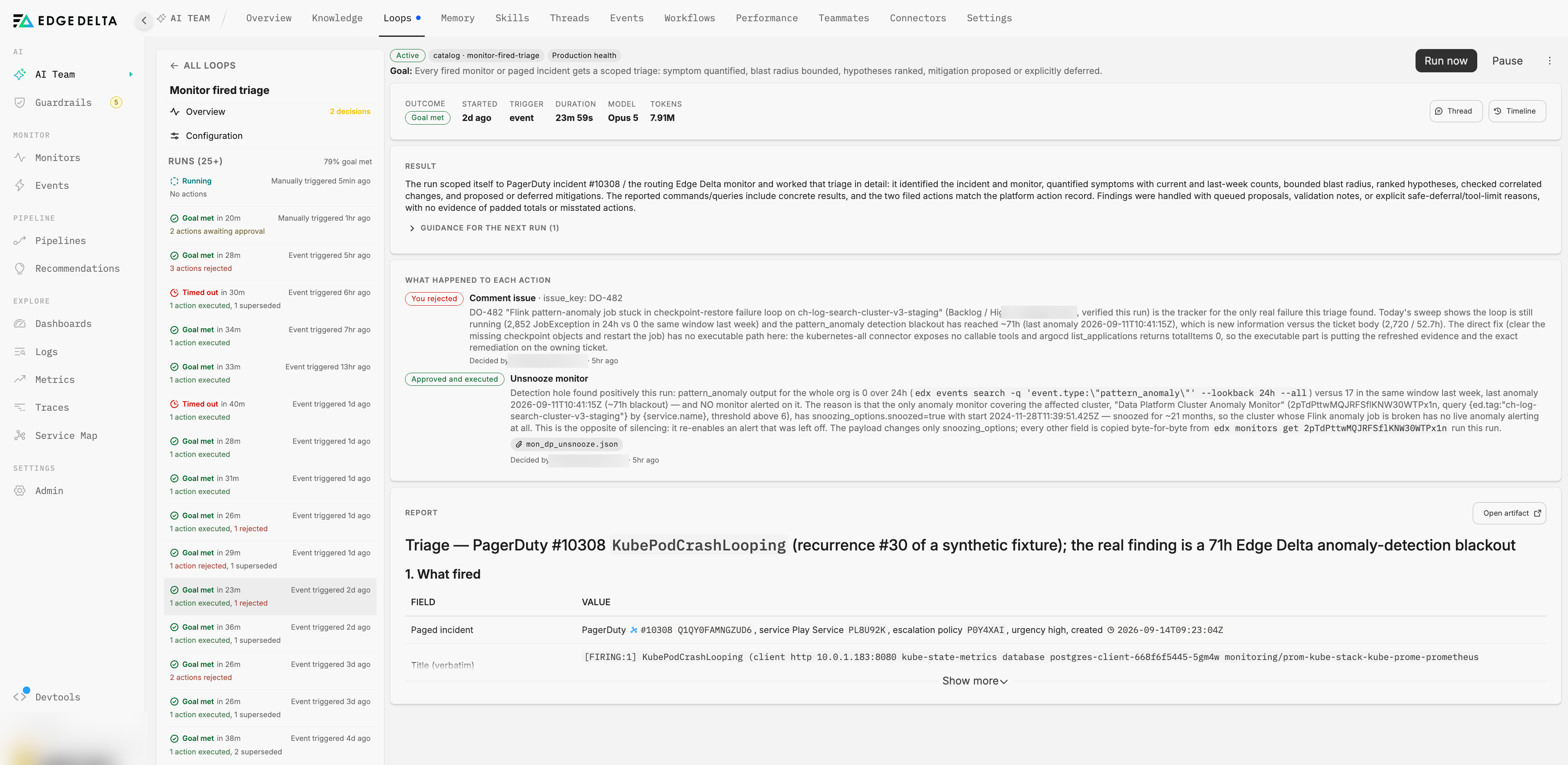
Open a run from the rail on the loop’s page. The header strip shows Outcome, Started, Trigger, Duration, Model, Tokens, and Helper agents, with buttons to open the projected Thread and the Timeline. Below it, in order:
- Decisions waiting on you from this run, if any, with Approve and Deny.
- Result: the evaluator’s verdict and reasoning, with unmet criteria or guidance for the next run.
- What happened to each action: every action the run filed and its outcome, with a fold for the predicted effect, validation, and exactly what executes.
- Report: the run’s full report, with Open artifact for the rendered version.
The run rail is paged, so long-lived loops keep their full history reachable.
Next steps
- Loop actions and approvals for how proposed actions are gated, decided, and executed.
- Anatomy of a loop for triggers, limits, and loop notes.
- Channels and Activity to follow runs where they project.