Loops Overview
6 minute read
Overview
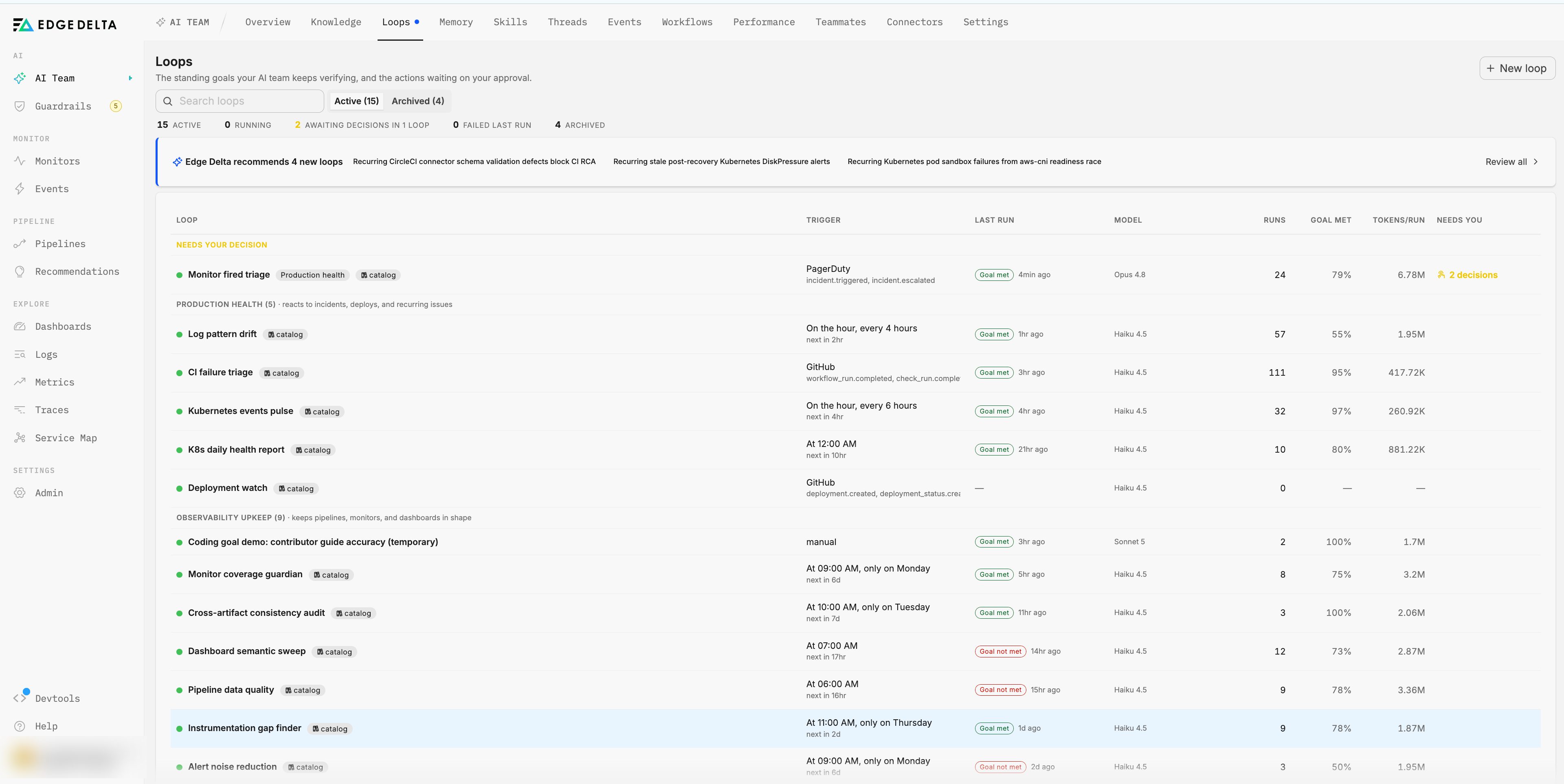
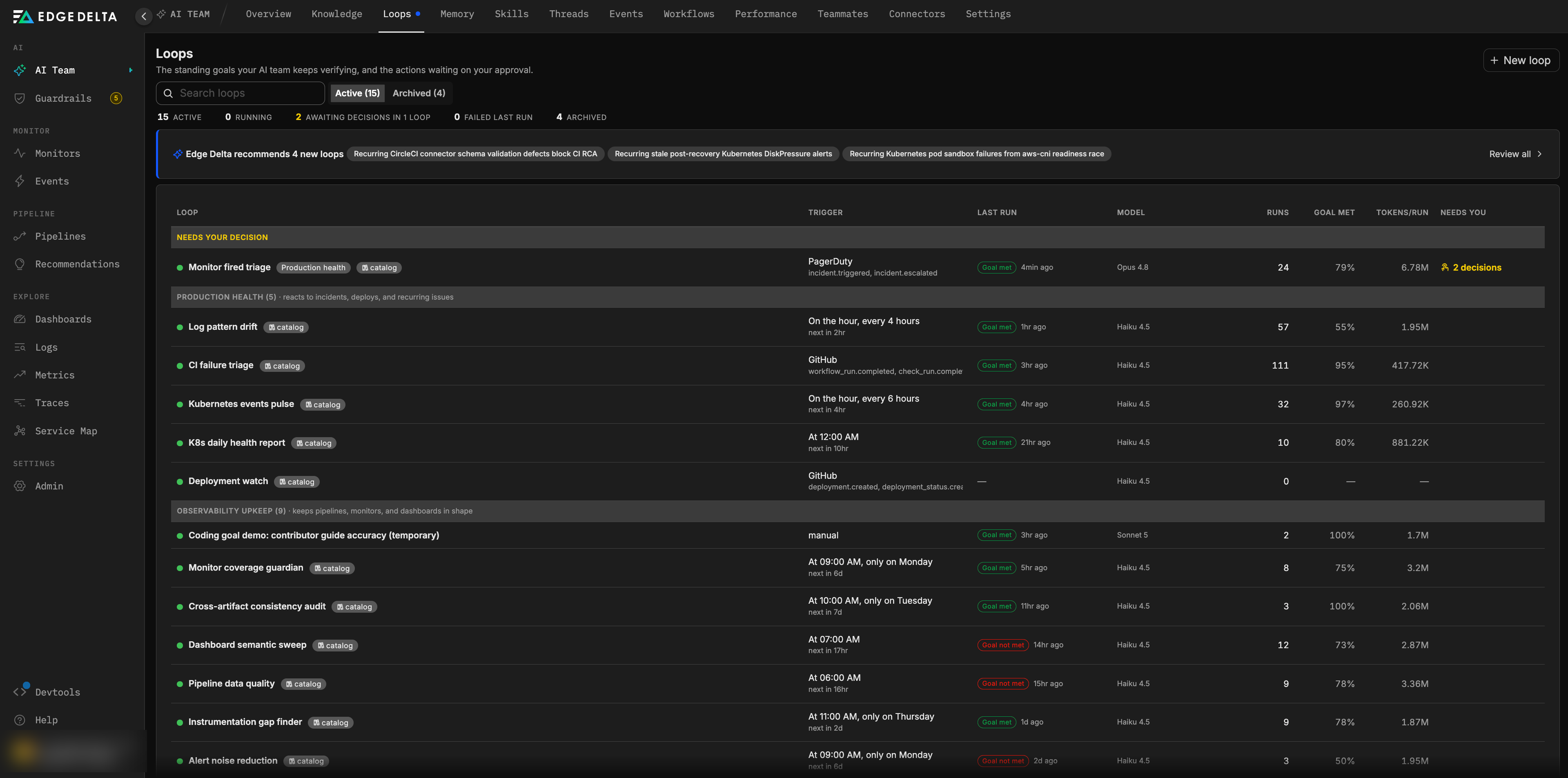
A loop is a standing goal that the Edge Delta AI Team keeps verifying. You describe an outcome in plain language, for example “every deployment of checkout-service is verified healthy within 15 minutes,” and choose when it should be checked. From then on, each time the trigger fires, a loop run investigates your telemetry, reports what it found with evidence, proposes any change through your trust level, and is graded against the success criteria you set. What the run learned carries into the next one.
Loops are the mechanism behind continuous operations in Edge Delta. A monitor tells you a threshold was crossed. A workflow executes a fixed sequence of steps. A loop holds a goal and keeps working toward it: it decides what to query, judges whether the goal is met, files changes for approval when it is not, and comes back to check again.
Why loops
Most operational work is reactive. A person writes a monitor, an alert fires, and a person investigates. Toil grows with the system, and there is rarely proof that a fix actually held. Loops invert that pattern:
- Verification is continuous. A loop checks the outcome you care about on its own cadence, not only when something pages you.
- Fixes are verified in the data. A run is judged on evidence it gathered, and remediation loops re-check the environment after an action executes.
- Autonomy is bounded. Every side-effecting change passes through the Guardrails trust ladder. At lower levels it is reported or drafted, at
L3it waits for your approval, and atL4it executes and notifies you. - Knowledge accumulates. Each run leaves notes for the next, so baselines, owners, and known-benign signals are not rediscovered every time.
The cycle a run follows
Every loop run works through the same cycle, whether it is verifying a deployment, watching a recurring issue, or auditing dashboards.
| Stage | What happens in a loop run |
|---|---|
| Detect | The trigger fires: a schedule tick, a connector event such as a GitHub deployment or a PagerDuty incident, a monitor notification, an approved issue action, or a manual Run now. |
| Investigate | The run reads telemetry, events, and connected systems with read-only tools first. It follows the procedures in its attached skills and starts from the notes left by previous runs. |
| Reason | The run writes a report in which every claim cites the query or command that produced it. Findings that need handling are named explicitly. |
| Act | For any change, the run files a proposed action instead of calling a write tool directly. The trust gate resolves the action against the effective trust level for its domain and reports, drafts, queues, or executes it. |
| Verify | A separate goal evaluator grades the report against the success criteria and records Goal met or Goal not met. Remediation loops re-run after an action executes to confirm the environment actually recovered. |
| Learn | The run replaces the loop notes with what it learned, and the platform posts the report to the loop’s configured surfaces. Runs can also suggest new loops when they find something nothing is watching. |
The stages are described in detail in Loop runs and Loop actions and approvals.
Two classes of loops
Every loop belongs to one of two classes. The class describes the loop’s purpose and influences which model runs it.
| Class | Purpose | Typical goals |
|---|---|---|
| Production health | Reacts to incidents, deploys, and recurring issues. | Verify each deployment, triage every paged incident, watch a recurring issue until it stays fixed, report cluster health daily. |
| Observability upkeep | Keeps pipelines, monitors, and dashboards in shape. | Find monitor coverage gaps, retune noisy alerts, fix broken dashboard widgets, propose processors for pipeline data quality. |
Standing and bounded loops
A standing loop has no end. It keeps running on its trigger until you pause or delete it. Most loops are standing loops: deployment verification, weekly audits, and recurring reports never reach a point where the goal is permanently satisfied.
A bounded loop carries an attempt budget. It runs until a run is graded Goal met, at which point the loop finishes with the state Goal reached, or until the budget is exhausted, at which point it finishes as Max runs reached. Loops created to resolve a specific issue are bounded: once the issue is verified fixed, the loop’s work is done. If the same issue recurs later, the loop resumes rather than a new one being created.
Where loops come from
| Origin | How the loop is created |
|---|---|
| You | Describe a goal in plain words on the Loops page. Edge Delta drafts the full configuration for your review, and nothing runs until you confirm it. |
| Edge Delta | A set of loops ships out of the box. Connecting a matching connector activates each one automatically. See Out-of-the-box loops. |
| An issue | A recurring or unverified issue gets a suggested resolution loop that re-checks the issue’s open actions on a cadence set by its severity. |
| A thread | A resolved investigation in a channel can become a loop that re-runs its checks, with the procedure saved as a reusable skill. |
| A loop | A run can propose a new loop when it finds a condition nothing is watching. The proposal lands in Suggested loops and waits for you. |
How loops fit with the rest of the AI Team
- Issues. A loop can be bound to an issue. Its success criteria are the issue’s open actions, approving an action on the issue triggers a re-verification run, and closing the issue completes the loop. See Issue details.
- Monitors. Route a monitor’s notifications to a loop from the monitor’s notification settings, so a fired monitor starts a run with the monitor event as context. See Monitor notifications.
- Connectors. Event connectors such as GitHub and PagerDuty trigger event loops, and every connector’s tools are available to a run within your trust level. See Connectors.
- Guardrails. The trust ladder, domain overrides, and freeze control decide what a loop’s proposed actions may do. The approval queue collects every loop action waiting on a person. See Guardrails.
- Channels and threads. Every run projects into a channel thread, and can also post to Slack, GitHub, email, a webhook, or a connector such as PagerDuty incident notes.
- Skills. Skills are reusable procedures a run loads on demand. Edge Delta ships a set, and you can install more or save your own. See Skills.
- Workflows. Workflows remain the right tool for deterministic, step-by-step automation. Loops are for goals that need judgment, evidence, and verification across runs. See Workflows.
Next steps
- Anatomy of a loop for every part of a loop’s definition and its states.
- Creating and managing loops to create your first loop from a goal.
- Out-of-the-box loops for the loops that activate when you connect a matching connector.
- Guardrails to set how much a loop may do on its own.