Edge Delta OTTL Context Filter Processor
3 minute read
Overview
The OTTL Context Filter processor captures logs that occur before and after a triggering condition is met. This is useful for debugging scenarios where you need to see the context surrounding an error or specific event, such as the log entries leading up to and following an error message.
For example, when an ERROR log is detected, you can capture the 5 INFO logs that occurred before and after the error to understand what was happening in the system.
Configuration
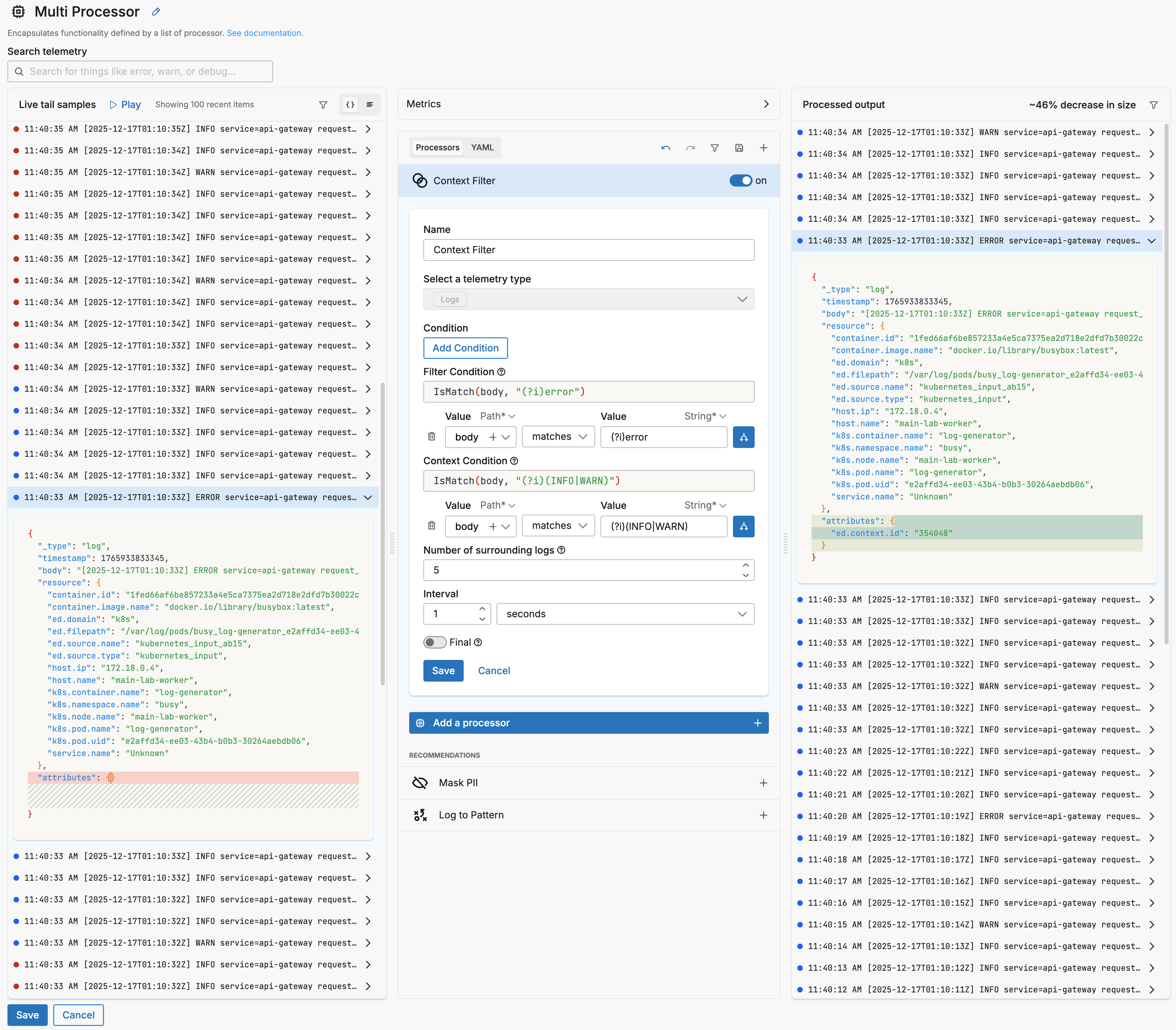
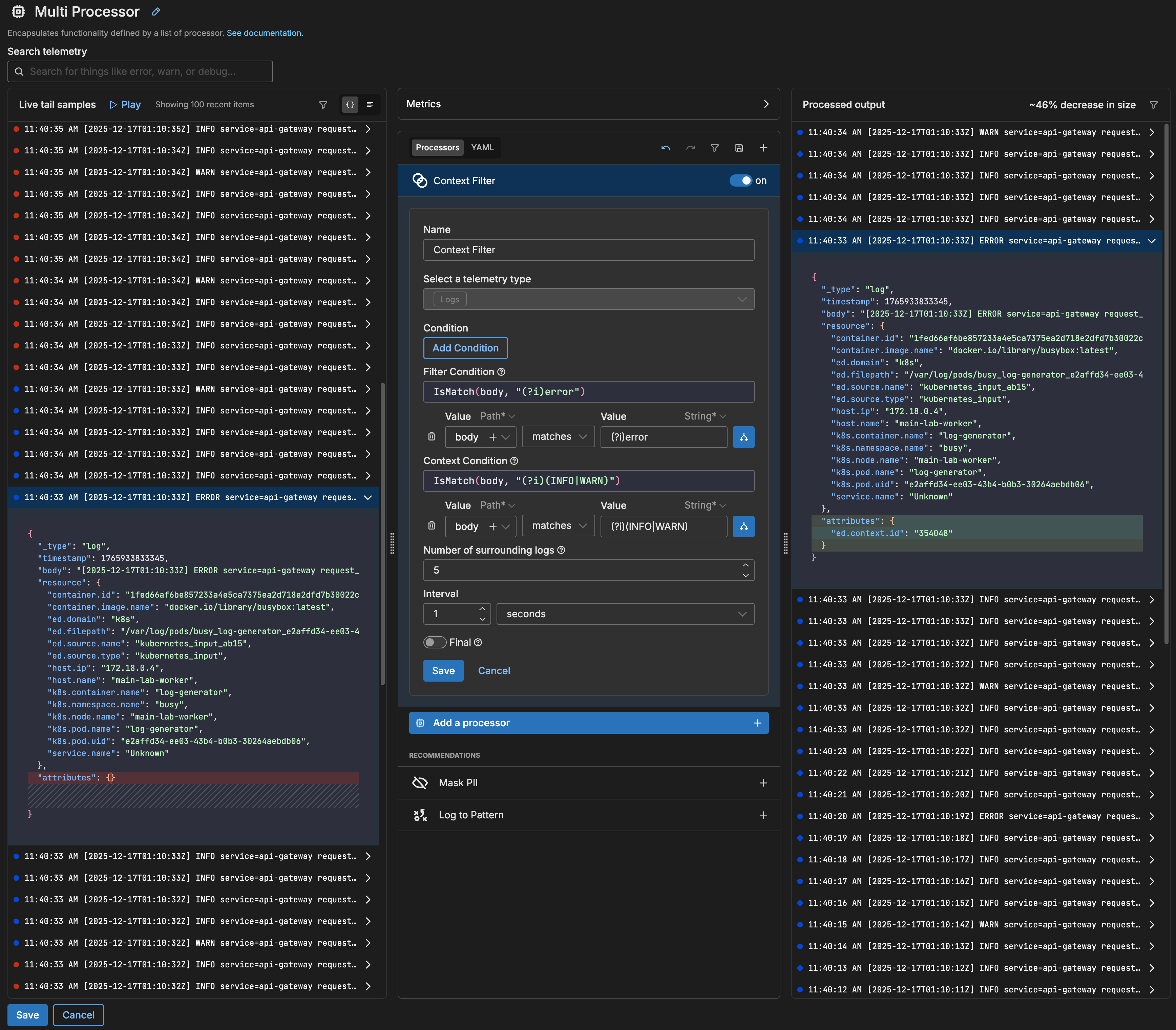
- name: Multi Processor
  type: sequence
  processors:
  - type: ottl_context_filter
    data_types:
    - log
    ottl_context_filter:
      condition: IsMatch(body, "(?i)error")
      ottl_context_filter_context:
        condition: IsMatch(body, "(?i)(INFO|WARN)")
        length: 5
        interval: 1s
This configuration triggers context collection when an ERROR log is detected. It captures up to 5 INFO or WARN logs that occurred before and after the triggering ERROR log, with context also collected every second. Logs that don’t match the trigger or context conditions are dropped, reducing traffic volume while preserving the context needed for debugging.
Options
condition
The OTTL condition applied to incoming data items. This is the outer filter condition that determines which items are considered for context collection.
condition: attributes["target"] == "Test"
data_types
You can specify, log, metric, trace or all. It is specified using the interface, which generates a YAML list item for you under the data_types parameter. This defines the data item types against which the processor must operate. If data_types is not specified, the default value is all. It is optional.
It is defined in YAML as follows:
- name: multiprocessor
  type: sequence
  processors:
  - type: <processor type>
    data_types:
    - log
ottl_context_filter
The context filter configuration block.
condition (Trigger Condition)
The OTTL condition that triggers context collection. When this condition evaluates to true, the processor emits the buffered context logs along with the triggering log.
ottl_context_filter:
  condition: IsMatch(body, "(?i)error")
ottl_context_filter_context
Configuration for what logs to collect as context.
condition (Context Condition)
The OTTL condition that determines which logs are collected as context. Logs matching this condition are buffered until the main trigger condition is met.
ottl_context_filter_context:
  condition: IsMatch(body, "(?i)(INFO|WARN)")
length
The number of context logs to buffer before and after the triggering event. Maximum value is 500.
ottl_context_filter_context:
  length: 5
interval
Optional duration interval to trigger context collection. If both length and interval are set, context collection is triggered when either condition is met.
ottl_context_filter_context:
  interval: 30s
Example: Capture context around errors
This example captures 10 logs before and after any ERROR-level log, collecting all log levels as context:
- name: Multi Processor
  type: sequence
  processors:
  - type: ottl_context_filter
    data_types:
    - log
    ottl_context_filter:
      condition: IsMatch(body, "(?i)error")
      ottl_context_filter_context:
        length: 10
Example: Time-based context collection
This example triggers context collection either when 5 context logs are buffered or after 1 minute, whichever comes first:
- name: Multi Processor
  type: sequence
  processors:
  - type: ottl_context_filter
    data_types:
    - log
    ottl_context_filter:
      condition: attributes["status_code"] >= 500
      ottl_context_filter_context:
        condition: IsMatch(body, ".*request.*")
        length: 5
        interval: 1m
See Also
- For an overview and to understand processor sequence flow, see Processors Overview
- To learn how to configure a processor, see Configure a Processor.
- For optimization strategies, see Best Practices for Edge Delta Processors.
- If you’re new to pipelines, start with the Pipeline Quickstart Overview or learn how to Configure a Pipeline.
- Looking to understand how processors interact with sources and destinations? Visit the Pipeline Overview.