Edge Delta Pack Processor
7 minute read
Overview
The Pack processor applies the processing logic from a pack inline within a processor sequence. Packs are reusable pipeline configurations that aggregate multiple processing steps into a single object. By using the Pack processor, you can leverage existing pack logic without adding separate nodes to your pipeline.
This processor is useful when you want to:
- Apply standardized processing logic from your organization’s pack library
- Reuse pre-built Edge Delta packs within a processor sequence
- Maintain consistency by using the same pack logic across multiple pipelines
For more information about packs, see Packs Overview.
Configuration
Select a pack from the dropdown list to apply its processing logic. The dropdown includes packs from both your organization’s library and the Edge Delta Packs Library.
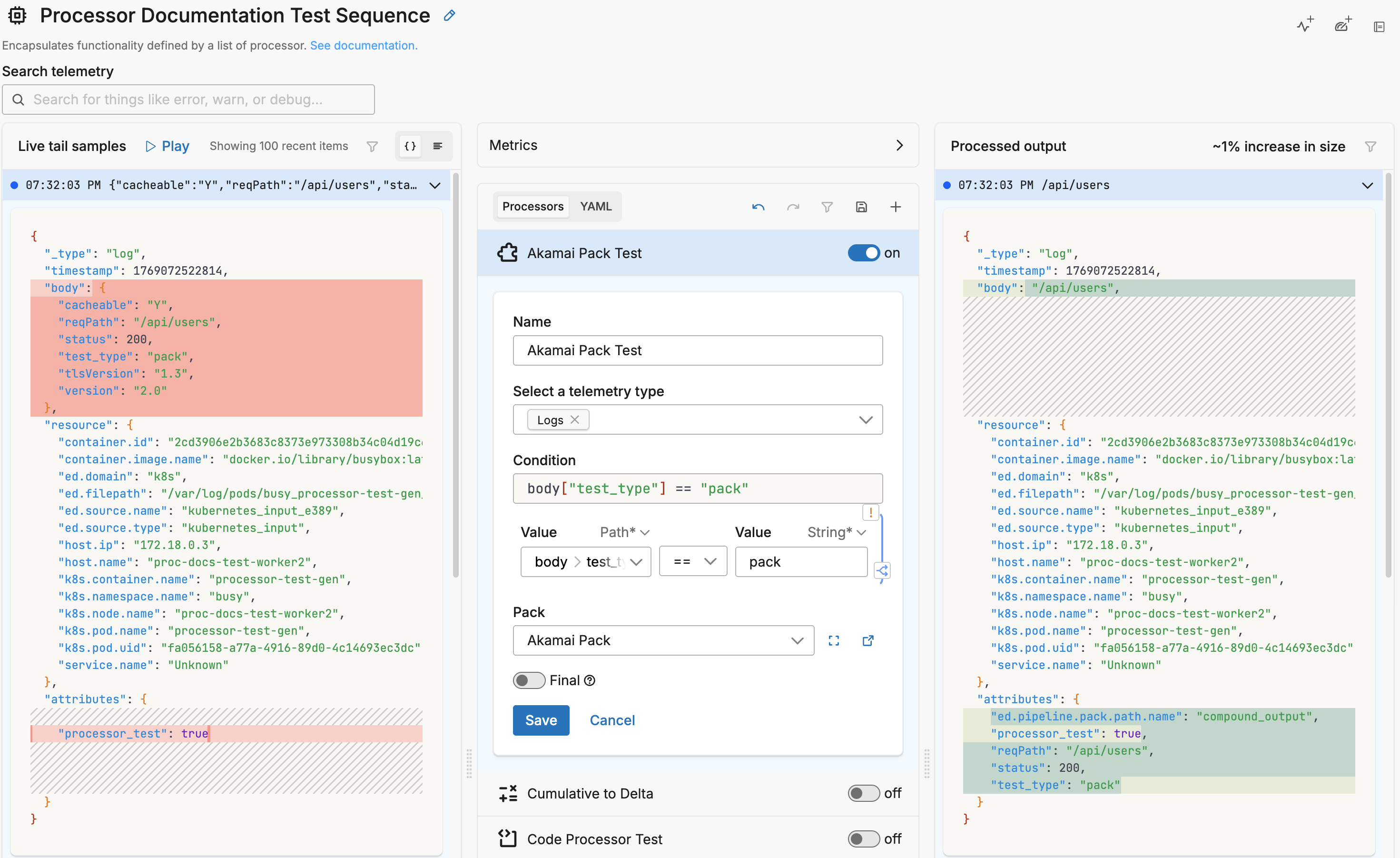

When you select a pack, the processor generates a compound type configuration that embeds the pack’s nodes and links:
- name: Multiprocessor
  type: sequence
  processors:
  - type: compound
    metadata: '{"id":"abc123","type":"compound","name":"Akamai Pack"}'
    data_types:
    - log
    nodes:
    - name: compound_input
      type: compound_input
      resource_fields: {}
    - name: compound_output
      type: compound_output
      resource_fields: {}
    # ... additional processing nodes from the pack
    links:
    - from: compound_input
      to: first_processor
    # ... additional links defining the processing flow
    node_reference: 9f4d7590-7634-4d60-af6b-320a02529927
Example: Akamai Pack
The Akamai pack processes Akamai CDN logs by parsing JSON, removing empty fields, and extracting key paths:
- type: compound
  metadata: '{"id":"01bV6liVmGLdmRjZZmWFf","type":"compound","name":"Akamai Pack"}'
  data_types:
  - log
  nodes:
  - name: compound_input
    type: compound_input
    resource_fields: {}
  - name: compound_output
    type: compound_output
    resource_fields: {}
  - name: drop-empty
    type: mask
    pattern: ',\s*"[^"]+"\s*:\s*"-"\s*,'
    resource_fields: {}
    mask: ','
  - name: parse_json_attributes
    type: parse_json_attributes
    resource_fields: {}
  - name: drop-empty-end
    type: mask
    pattern: \,\"\w+\"\:\"\-\"\}
    resource_fields: {}
    mask: '}'
  - name: drop-unimportant-fields
    type: log_transform
    resource_fields: {}
    transformations:
    - field_path: item.attributes.cacheable
      operation: delete
    - field_path: item.attributes.tlsVersion
      operation: delete
    - field_path: item.attributes.version
      operation: delete
  - name: extract_path
    type: extract_json_field
    resource_fields: {}
    field_path: reqPath
    keep_log_if_failed: true
  - name: Failures
    type: compound_output
    resource_fields: {}
  links:
  - from: compound_input
    to: drop-empty
  - from: drop-empty
    to: drop-empty-end
  - from: drop-empty-end
    to: parse_json_attributes
  - from: parse_json_attributes
    to: drop-unimportant-fields
  - from: parse_json_attributes
    path: failure
    to: Failures
  - from: drop-unimportant-fields
    to: extract_path
  - from: extract_path
    to: compound_output
  - from: extract_path
    path: failure
    to: Failures
  node_reference: 9f4d7590-7634-4d60-af6b-320a02529927
Sample Input and Output
This example demonstrates the Akamai Pack processing a CDN log, removing empty fields and extracting the request path.
Sample Input:
{
  "_type": "log",
  "timestamp": 1769070477170,
  "body": {
    "test_type": "pack",
    "reqPath": "/api/users",
    "cacheable": "Y",
    "tlsVersion": "1.3",
    "version": "2.0",
    "status": 200,
    "method": "GET",
    "clientIp": "192.168.1.1"
  },
  "resource": {
    "k8s.namespace.name": "busy",
    "k8s.pod.name": "processor-test-gen"
  },
  "attributes": {}
}
Sample Output:
{
  "_type": "log",
  "timestamp": 1769070477170,
  "body": {
    "test_type": "pack",
    "reqPath": "/api/users",
    "status": 200,
    "method": "GET",
    "clientIp": "192.168.1.1"
  },
  "resource": {
    "k8s.namespace.name": "busy",
    "k8s.pod.name": "processor-test-gen"
  },
  "attributes": {
    "reqPath": "/api/users",
    "status": 200,
    "test_type": "pack"
  }
}
The Akamai Pack performed these transformations:
- Removed fields:
cacheable,tlsVersion,version(configured as unimportant) - Extracted reqPath: The
reqPathfield was extracted and added to attributes - Parsed JSON: Body fields were parsed into attributes
Options
Select a telemetry type
You can specify, log, metric, trace or all. It is specified using the interface, which generates a YAML list item for you under the data_types parameter. This defines the data item types against which the processor must operate. If data_types is not specified, the default value is all. It is optional.
It is defined in YAML as follows:
- name: multiprocessor
  type: sequence
  processors:
  - type: <processor type>
    data_types:
    - log
Condition
The condition parameter contains a conditional phrase of an OTTL statement. It restricts operation of the processor to only data items where the condition is met. Those data items that do not match the condition are passed without processing. You configure it in the interface and an OTTL condition is generated. It is optional.
Important: All conditions must be written on a single line in YAML. Multi-line conditions are not supported.
Comparison Operators
| Operator | Name | Description | Example |
|---|---|---|---|
== | Equal to | Returns true if both values are exactly the same | attributes["status"] == "OK" |
!= | Not equal to | Returns true if the values are not the same | attributes["level"] != "debug" |
> | Greater than | Returns true if the left value is greater than the right | attributes["duration_ms"] > 1000 |
>= | Greater than or equal | Returns true if the left value is greater than or equal to the right | attributes["score"] >= 90 |
< | Less than | Returns true if the left value is less than the right | attributes["load"] < 0.75 |
<= | Less than or equal | Returns true if the left value is less than or equal to the right | attributes["retries"] <= 3 |
matches | Regex match | Returns true if the string matches a regular expression (generates IsMatch function) | IsMatch(attributes["name"], ".*\\.log$") |
Logical Operators
Important: Use lowercase and, or, not - uppercase operators will cause errors!
| Operator | Description | Example |
|---|---|---|
and | Both conditions must be true | attributes["level"] == "ERROR" and attributes["status"] >= 500 |
or | At least one condition must be true | attributes["log_type"] == "TRAFFIC" or attributes["log_type"] == "THREAT" |
not | Negates the condition | not IsMatch(attributes["path"], "^/health") |
Functions
| Function | Description | Example |
|---|---|---|
IsMatch | Returns true if string matches the regex pattern | IsMatch(attributes["message"], "ERROR\|FATAL") |
Field Existence Checks
| Check | Description | Example |
|---|---|---|
!= nil | Field exists (not null) | attributes["user_id"] != nil |
== nil | Field doesn’t exist | attributes["optional_field"] == nil |
!= "" | Field is not empty string | attributes["message"] != "" |
Common Examples
- name: _multiprocessor
  type: sequence
  processors:
  - type: <processor type>
    # Simple equality check
    condition: attributes["request"]["path"] == "/json/view"

  - type: <processor type>
    # Multiple values with OR
    condition: attributes["log_type"] == "TRAFFIC" or attributes["log_type"] == "THREAT"

  - type: <processor type>
    # Excluding multiple values (NOT equal to multiple values)
    condition: attributes["log_type"] != "TRAFFIC" and attributes["log_type"] != "THREAT"

  - type: <processor type>
    # Complex condition with AND/OR/NOT
    condition: (attributes["level"] == "ERROR" or attributes["level"] == "FATAL") and attributes["env"] != "test"

  - type: <processor type>
    # Field existence and value check
    condition: attributes["user_id"] != nil and attributes["user_id"] != ""

  - type: <processor type>
    # Regex matching on attributes
    condition: IsMatch(attributes["path"], "^/api/") and not IsMatch(attributes["path"], "^/api/health")

  - type: <processor type>
    # Regex matching on body (case-insensitive)
    condition: IsMatch(body, "(?i)error")
Common Mistakes to Avoid
# WRONG - Cannot use OR/AND with values directly
condition: attributes["log_type"] != "TRAFFIC" OR "THREAT"

# CORRECT - Must repeat the full comparison
condition: attributes["log_type"] != "TRAFFIC" and attributes["log_type"] != "THREAT"

# WRONG - Uppercase operators
condition: attributes["status"] == "error" AND attributes["level"] == "critical"

# CORRECT - Lowercase operators
condition: attributes["status"] == "error" and attributes["level"] == "critical"

# WRONG - Multi-line conditions
condition: |
  attributes["level"] == "ERROR" and
  attributes["status"] >= 500

# CORRECT - Single line (even if long)
condition: attributes["level"] == "ERROR" and attributes["status"] >= 500
Pack
Select a pack from the dropdown list. The list includes:
- Organization Packs: Packs created by you or users in your organization
- Packs Library: Pre-designed packs created by Edge Delta for specific use cases
The selected pack’s processing logic is embedded as a compound processor with:
- nodes: The processing nodes from the pack (inputs, outputs, and transformations)
- links: The data flow connections between nodes
- node_reference: A reference to the original pack definition
Final
Determines whether successfully processed data items should continue through the remaining processors in the same processor stack. If final is set to true, data items output by this processor are not passed to subsequent processors within the node—they are instead emitted to downstream nodes in the pipeline (e.g., a destination). Failed items are always passed to the next processor, regardless of this setting.
The UI provides a slider to configure this setting. The default is false. It is defined in YAML as follows:
- name: multiprocessor
  type: sequence
  processors:
    - type: <processor type>
    final: true
Compound Processor Structure
The Pack processor generates a compound type processor with the following structure:
| Field | Description |
|---|---|
type | Always compound for pack processors |
metadata | JSON metadata including the pack name |
data_types | Telemetry types to process (log, metric, trace) |
nodes | Array of processing nodes from the pack |
links | Array of connections defining data flow |
node_reference | UUID reference to the original pack |
Special Node Types
| Node Type | Description |
|---|---|
compound_input | Entry point for data into the pack |
compound_output | Exit point for successfully processed data |
compound_output (with failure path) | Exit point for data that failed processing |
See Also
Packs Overview - Learn about packs and how they work
Packs Library - Browse pre-designed packs from Edge Delta
Create a Pack - Build custom packs for your organization