Real User Monitoring
Monitor page load performance, Core Web Vitals, and JavaScript errors from real users and correlate them with backend telemetry in Edge Delta.
4 minute read
Overview
Real User Monitoring (RUM) captures how real visitors experience your web application. The Edge Delta browser SDK reports page load performance, Core Web Vitals, single page application route changes, and JavaScript errors from your users’ browsers to an Edge Delta ingestion pipeline, where the data lands alongside your backend telemetry.
flowchart LR
    A["Visitor's browser
RUM SDK"] -->|"OTLP over HTTPS"| B["Ingestion pipeline
HTTP ingestion source"]
    B --> C["Edge Delta"]
    C --> D["Trace Explorer
views, requests, Web Vitals"]
    C --> E["Log Search
JavaScript errors"]
You can install the SDK as a script tag served from Edge Delta’s CDN or as the @edgedelta/browser-rum npm package with a Vite plugin. No agent is required either way: the SDK sends data directly to an ingestion pipeline as OpenTelemetry (OTLP) signals:
- Views arrive as trace spans. Each page load produces a
documentLoadspan and each route change produces arouteChangespan, carrying navigation timings and Core Web Vitals, which you can explore in the Trace Explorer. Optionally, everyfetchand XHR call becomes a request span that can join your backend traces through W3C trace context. - JavaScript errors arrive as log records. Errors gain pattern grouping and full text search in Log Search, each error links back to the view it happened in through a shared trace ID, and each carries a breadcrumb trail of what happened before it.
How it works
Both install paths begin with a small loader. It installs global error listeners immediately and buffers anything thrown while the page is still loading, then the full SDK takes over and drains the buffer, so errors thrown before the SDK finished loading are still reported. This is why the loader belongs first in <head>: the most interesting failures often happen during page load.
Once running, the SDK organizes the visit into views: the document load is one view, and each route change in a single page application opens another. Every view is one trace, with its own span and its own Core Web Vitals, and everything that happens while it is open shares its trace ID. Data flows to your ingestion pipeline over HTTPS:
- During the visit, the SDK collects navigation timings, Core Web Vitals, route changes, breadcrumbs, and errors. Errors are batched and sent within a few seconds.
- When the visitor leaves or backgrounds the page, the SDK sends the open view’s span. It waits deliberately: Cumulative Layout Shift (CLS) and Interaction to Next Paint (INP) keep changing while the view is open and are only final then.
- The ingestion pipeline receives the data on its OTLP endpoints and forwards it to the Edge Delta backend.
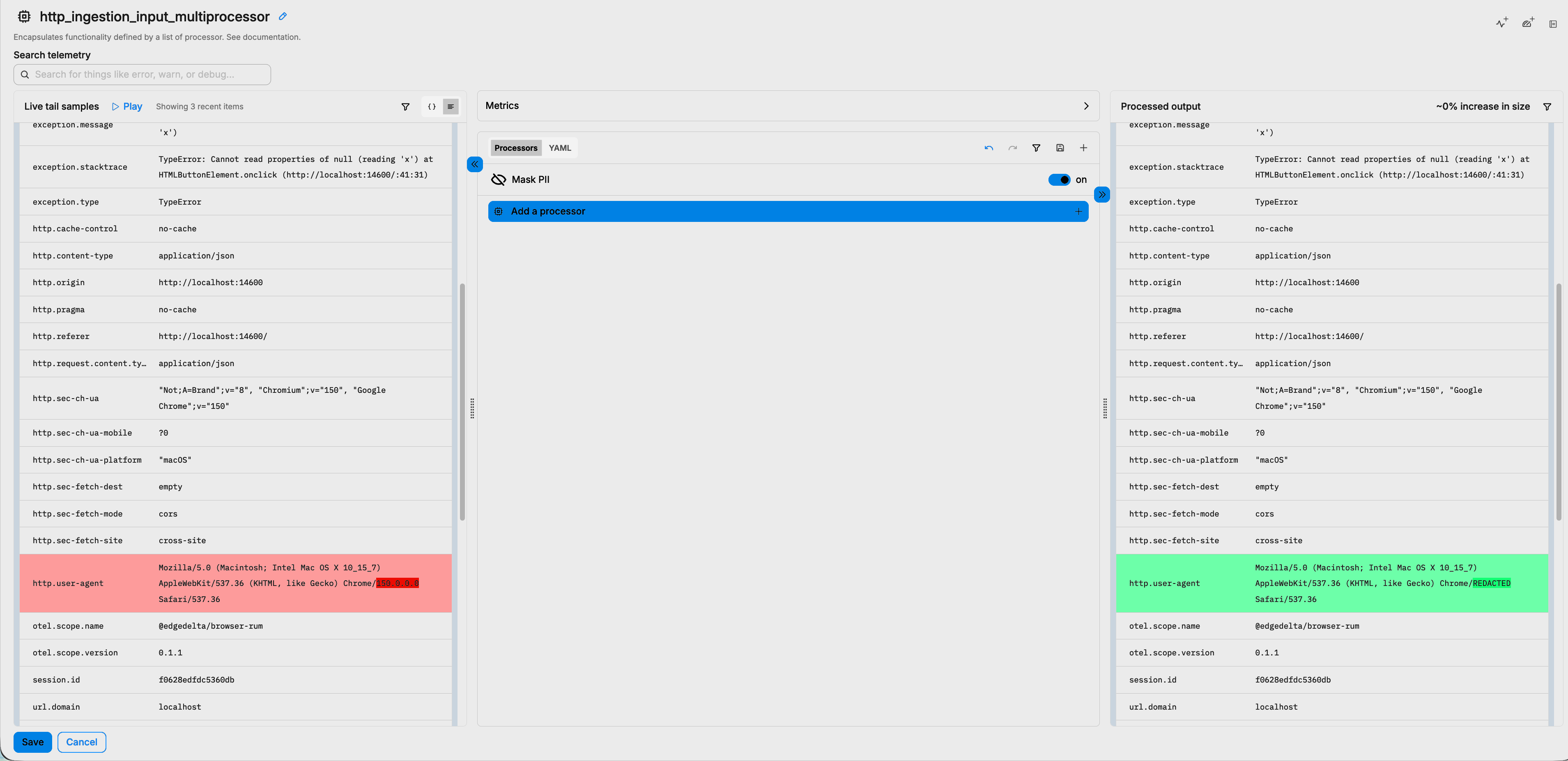
Because RUM data flows through a pipeline, the same controls you use for other telemetry apply. You can add stateless processors to mask personal data, filter noise, or transform attributes before the data is stored. See Ingestion Pipelines for the supported processors.
What gets collected
The SDK emits two signals, so RUM data appears in two places:
| Signal | Contains | Where to view |
|---|---|---|
| View spans | One documentLoad span per page load and one routeChange span per SPA navigation, with load phase timings and Core Web Vitals | Trace Explorer |
| Request spans | One client span per fetch or XHR call, when requestSpans is enabled, joinable to backend traces | Trace Explorer |
| Error logs | Uncaught errors, unhandled promise rejections, handled errors, and messages, with type, message, stack trace, and breadcrumbs | Log Search |
Everything a view emits shares one trace ID, and a visitor’s views share a session ID. This lets you pivot from an error to the view it happened in, then widen to everything else that visitor did. See the RUM Data Reference for the full attribute list.
Sessions and sampling
A session groups the views and errors of one visit. A session ends after 15 minutes of inactivity and is capped at 4 hours. The sampling decision is made once per session, so a recorded session is recorded completely rather than half-captured. You control the fraction of sessions recorded with the sampleRate option.
Privacy and data controls
RUM runs in your users’ browsers, so the SDK defaults are conservative about what leaves the page:
- URL query strings and fragments are stripped before sending, on views and on request spans alike, since they routinely carry tokens and personal data. Only the origin and path are reported.
- User identity is opt-in. The SDK sends no user fields unless you call
setUser. - Breadcrumb click descriptors are structural only, such as element tags and IDs. Text content, input values, and
aria-labelvalues are never read. - An
ignoreErrorslist, abeforeSendhook, and middleware give you a last chance to redact or drop any event before it leaves the browser. - The ingestion token is public by design and grants only the ability to send data. You can bind it to your own origins so it cannot be used from anywhere else.
For anything the SDK defaults do not cover, add processors to the ingestion pipeline. The following example masks a field on incoming RUM data with a Mask PII processor:
See RUM Configuration and API for all privacy controls.