If/Else Node
3 minute read
Overview
The If/Else node enables conditional branching in your workflow. Each condition creates a separate output port that you connect to different downstream paths, allowing your workflow to take different actions based on the data.
Configuration
To add an If/Else node to your workflow:
- Click Add Node and select If/Else
- Add two or more conditions
- Connect each output port to the appropriate downstream nodes
Options
Conditions
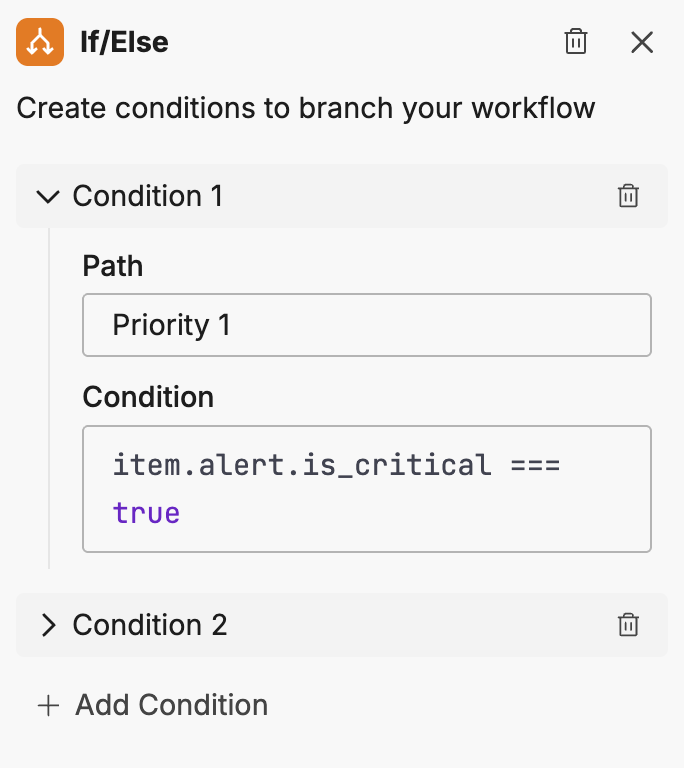
Each condition requires:
| Option | Description |
|---|---|
| Path | A name for this branch (displayed on the output port) |
| Condition | A JavaScript expression that evaluates to true or false |
Click Add Condition to add additional branches.
Writing conditions
Conditions are JavaScript expressions that evaluate against the workflow item data. Use the item object to access data from previous nodes.
Basic comparisons
item.severity === "critical"
item.alert.priority >= 3
item.source !== "test"
Boolean checks
item.alert.is_critical === true
!item.acknowledged
String operations
item.message.includes("error")
item.service.startsWith("prod-")
Combining conditions
item.severity === "high" && item.environment === "production"
item.priority > 2 || item.escalated === true
Output ports
Each condition creates an output port on the node. The ports are labeled with the Path name you specified.
When the workflow executes:
- Conditions are evaluated in order
- The item flows through the first port whose condition evaluates to true
- If no conditions match, the item does not continue (consider adding a catch-all condition)
Best practices
Design effective conditional logic:
- Use descriptive path names: Name branches clearly (for example, “Critical Alert”, “Low Priority”) so the workflow is self-documenting
- Order conditions carefully: Place more specific conditions before general ones
- Add a catch-all: Include a final condition like
trueto handle items that don’t match other conditions - Test with sample data: Verify conditions with realistic data before deploying
Example patterns
Severity-based routing
Route alerts to different channels based on severity:
| Path | Condition |
|---|---|
| Critical | item.severity === "critical" |
| High | item.severity === "high" |
| Other | true |
Environment filtering
Process only production events:
| Path | Condition |
|---|---|
| Production | item.environment === "production" |
| Non-Production | item.environment !== "production" |
AI-assessed severity routing
When a Teammate node returns JSON output, the response fields become available as item.* variables. Use conditions that reference these fields to route based on the teammate’s analysis. For example, you can combine a severity assessment with a confidence score to decide whether to escalate.
This pattern separates AI reasoning from operational decisions. The teammate assesses the situation. The If/Else node applies team-defined thresholds. See Structured output for deterministic branching for how to configure teammate JSON output, and Workflow Patterns for complete end-to-end examples.
Related resources
- Workflows Overview - Learn about workflow concepts and node types
- Transform Node - Modify data before conditional evaluation
- Workflow Patterns - End-to-end examples with branching