Transform Node
Configure the Transform node to modify and reshape data as it flows through your workflow.
2 minute read
Overview
The Transform node modifies data as it passes through the workflow. Use it to reshape objects, extract fields, calculate values, or prepare data for downstream nodes.
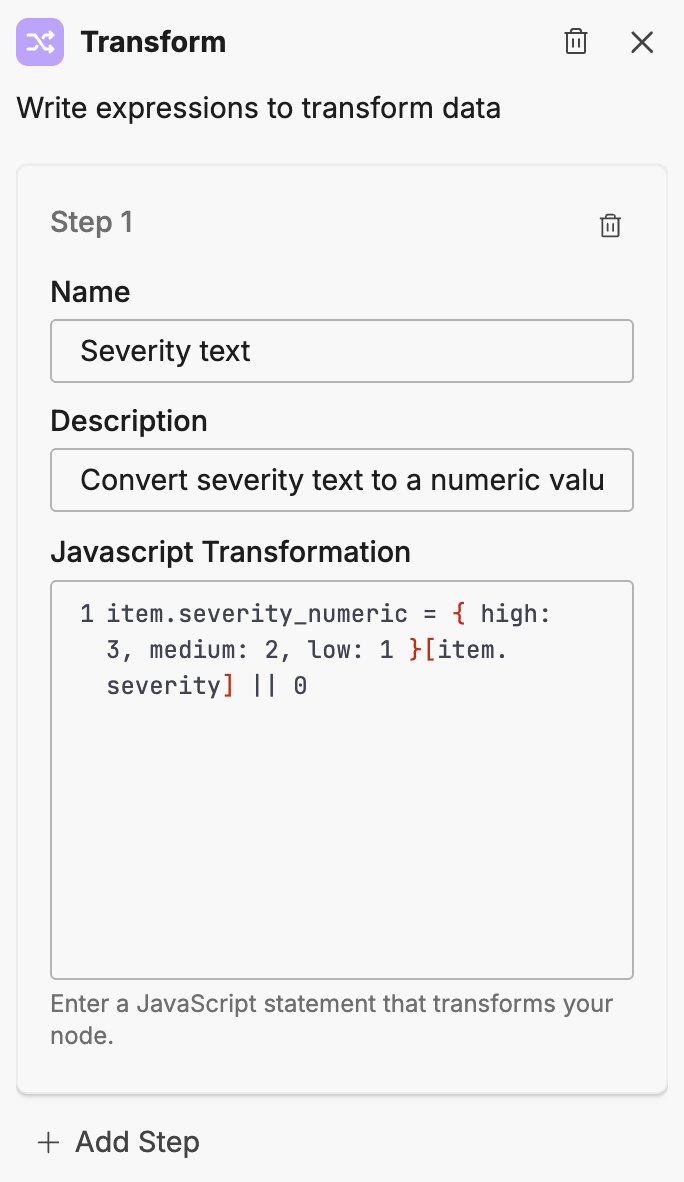
Configuration
To add a Transform node to your workflow:
- Click Add Node and select Transform
- Add one or more transformation steps
- Configure each step with JavaScript logic
Options
Transformation steps
Each step requires:
| Option | Description |
|---|---|
| Name | A label for the transformation |
| Description | What the transformation does |
| JavaScript statement | The transformation logic |
Click Add Step to add additional transformations to the same node.
Writing transformations
Transformations are JavaScript statements that modify the item object. Changes persist to downstream nodes.
Adding fields
item.processed_at = new Date().toISOString()
Extracting nested values
item.service_name = item.alert.labels.service
Calculating values
item.severity_numeric = { high: 3, medium: 2, low: 1 }[item.severity] || 0
String manipulation
item.short_message = item.message.substring(0, 100)
item.normalized_name = item.service.toLowerCase().replace(/\s+/g, '-')
Conditional assignment
item.priority = item.severity === 'critical' ? 'P1' : 'P2'
Array operations
item.tag_count = item.tags.length
item.first_tag = item.tags[0]
Object construction
item.summary = {
  title: item.alert.name,
  severity: item.severity,
  timestamp: item.created_at
}
Multiple steps
When you add multiple transformation steps, they execute in order. Each step can reference values set by previous steps.
Step 1:
item.severity_numeric = { critical: 4, high: 3, medium: 2, low: 1 }[item.severity]
Step 2:
item.is_urgent = item.severity_numeric >= 3
Best practices
Design effective transformations:
- Keep steps focused: Each step should do one thing
- Use descriptive names: Name steps to explain their purpose
- Handle missing data: Check for undefined values before accessing nested properties
- Validate types: Ensure data types match expected formats before transformation
Handling missing data
item.service = item.alert?.labels?.service || 'unknown'
Example patterns
Alert enrichment
Prepare alert data for notification:
| Step | JavaScript |
|---|---|
| Extract service | item.service = item.alert.labels.service |
| Format timestamp | item.time = new Date(item.timestamp).toLocaleString() |
| Build title | item.title = \[${item.severity.toUpperCase()}] ${item.alert.name}`` |
Data normalization
Standardize data from different sources:
| Step | JavaScript |
|---|---|
| Normalize severity | item.severity = item.priority ? { P1: 'critical', P2: 'high', P3: 'medium' }[item.priority] : item.severity |
| Extract environment | item.env = item.tags.find(t => t.startsWith('env:')).split(':')[1] |
Related resources
- Workflows Overview - Learn about workflow concepts and node types
- If/Else Node - Branch based on transformed data