Edge Delta Google Cloud Logging (OTTL) Destination
7 minute read
Overview
You can send logs from an Edge Delta pipeline to Google Cloud Logging by adding a google_cloud_logging_with_ottl_output destination node. This node supports OTTL expressions to dynamically construct values for log_name, labels, and resource metadata based on incoming data. Use the configuration wizard below to generate a starter YAML configuration.
- incoming_data_types: log, cluster_pattern_and_sample, custom
This node requires Edge Delta agent version v1.35.0 or higher.
Example Configuration
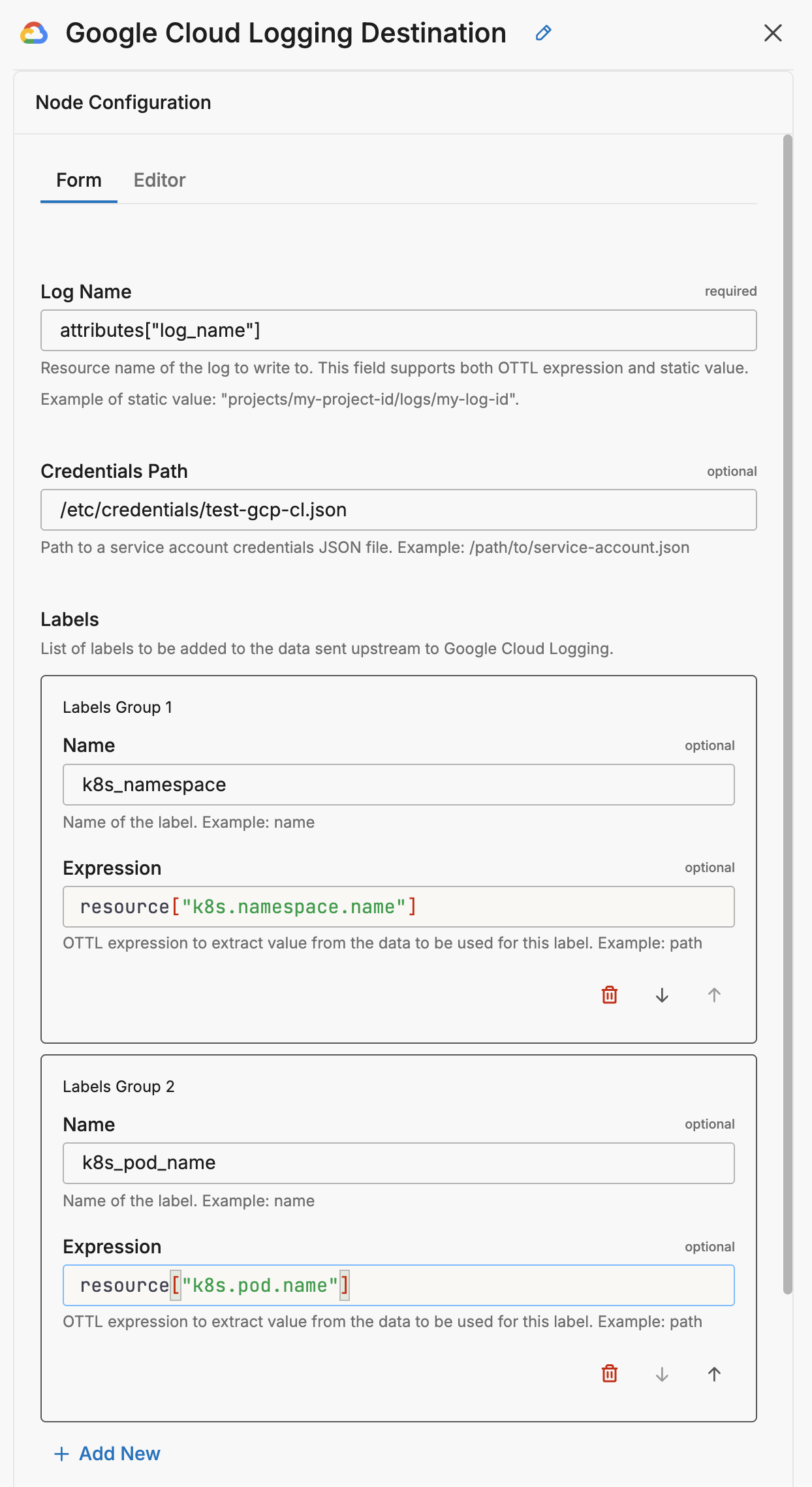
This configuration defines a Google Cloud Logging destination node named my_google_cloud_logging_output using the google_cloud_logging_with_ottl_output type. It dynamically sets the log_name and resource_type fields using OTTL expressions based on incoming event attributes. The node uses a JSON credentials file located at /etc/credentials/test-gcp-cl.json for authentication. It also appends Kubernetes-specific labels (k8s_namespace and k8s_pod_name) extracted from the event’s resource fields, and assigns structured resource metadata using the resource_labels_expression parameter.
nodes:
  - name: my_google_cloud_logging_output
    type: google_cloud_logging_with_ottl_output
    log_name: attributes["log_name"]
    credentials_path: /etc/credentials/test-gcp-cl.json
    resource_type_expression: attributes["resource_type"]
    labels:
      - name: k8s_namespace
        path: resource["k8s.namespace.name"]
      - name: k8s_pod_name
        path: resource["k8s.pod.name"]
    resource_labels_expression: attributes["resource_labels"]
Required Parameters
name
A descriptive name for the node. This is the name that will appear in pipeline builder and you can reference this node in the YAML using the name. It must be unique across all nodes. It is a YAML list element so it begins with a - and a space followed by the string. It is a required parameter for all nodes.
nodes:
  - name: <node name>
    type: <node type>
type: google_cloud_logging_with_ottl_output
The type parameter specifies the type of node being configured. It is specified as a string from a closed list of node types. It is a required parameter.
nodes:
  - name: <node name>
    type: <node type>
log_name
Defines the logName for the Cloud Logging payload. This can be a static string or an OTTL expression.
nodes:
  - name: my_google_cloud_logging_output
    type: google_cloud_logging_with_ottl_output
    log_name: attributes["log_name"]
Optional Parameters
disabled
The disabled parameter disables the node in the pipeline. When set to true, the agent ignores the node at startup. You can toggle nodes on or off in the pipeline builder. It is specified as a boolean, defaults to false, and is optional.
nodes:
  - name: <node name>
    type: <node type>
    disabled: true
keep_overridden_log_name
Minimum Agent Version: v2.8.0
The keep_overridden_log_name parameter specifies whether to retain the original log name value in the data item after applying a dynamic log_name expression. When set to true, the attribute used in the expression remains in the data. When set to false (default), the attribute is removed after being used for routing. It is specified as a Boolean and is optional.
nodes:
  - name: my_google_cloud_logging_output
    type: google_cloud_logging_with_ottl_output
    log_name: attributes["log_name"]
    keep_overridden_log_name: true
keep_overridden_resource_type
Minimum Agent Version: v2.8.0
The keep_overridden_resource_type parameter specifies whether to retain the original resource type value in the data item after applying the resource_type_expression. When set to true, the attribute used in the expression remains in the data. When set to false (default), the attribute is removed after being used. It is specified as a Boolean and is optional.
nodes:
  - name: my_google_cloud_logging_output
    type: google_cloud_logging_with_ottl_output
    log_name: attributes["log_name"]
    resource_type_expression: attributes["resource_type"]
    keep_overridden_resource_type: true
keep_overridden_path
Minimum Agent Version: v2.8.0
The keep_overridden_path parameter specifies whether to retain the original path value in the data item after applying a dynamic path expression. When set to true, the attribute used in the expression remains in the data. When set to false (default), the attribute is removed after being used. It is specified as a Boolean and is optional.
nodes:
  - name: my_google_cloud_logging_output
    type: google_cloud_logging_with_ottl_output
    log_name: attributes["log_name"]
    keep_overridden_path: true
keep_overridden_resource_labels
Minimum Agent Version: v2.8.0
The keep_overridden_resource_labels parameter specifies whether to retain the original resource labels in the data item after applying the resource_labels_expression. When set to true, the attributes used in the expression remain in the data. When set to false (default), the attributes are removed after being used. It is specified as a Boolean and is optional.
nodes:
  - name: my_google_cloud_logging_output
    type: google_cloud_logging_with_ottl_output
    log_name: attributes["log_name"]
    resource_labels_expression: attributes["resource_labels"]
    keep_overridden_resource_labels: true
credentials_path
Path to a Google Cloud service account JSON file.
nodes:
  - name: my_google_cloud_logging_output
    type: google_cloud_logging_with_ottl_output
    log_name: attributes["log_name"]
    credentials_path: /path/to/credentials.json
resource_type_expression
An OTTL expression to define the resource_type per incoming item. Defaults to logging_log if not set.
nodes:
  - name: my_google_cloud_logging_output
    type: google_cloud_logging_with_ottl_output
    log_name: attributes["log_name"]
    credentials_path: /path/to/credentials.json
    resource_type_expression: attributes["resource_type"]
labels
Adds labels to each log entry. Each label is defined by a name and an OTTL path expression.
nodes:
  - name: my_google_cloud_logging_output
    type: google_cloud_logging_with_ottl_output
    log_name: attributes["log_name"]
    credentials_path: /path/to/credentials.json
    labels:
      - name: k8s_namespace
        path: resource["k8s.namespace.name"]
      - name: k8s_container_name
        path: resource["k8s.container.name"]
      - name: k8s_pod_name
        path: resource["k8s.pod.name"]
resource_labels_expression
Expression that returns a map of resource labels to attach to the log entry.
nodes:
  - name: my_google_cloud_logging_output
    type: google_cloud_logging_with_ottl_output
    log_name: attributes["log_name"]
    credentials_path: /path/to/credentials.json
    resource_labels_expression: attributes["resource_labels"]
parallel_worker_count
Sets the number of workers writing in parallel. Default is 5.
nodes:
  - name: my_google_cloud_logging_output
    type: google_cloud_logging_with_ottl_output
    log_name: attributes["log_name"]
    credentials_path: /path/to/credentials.json
    parallel_worker_count: 6
metadata_mapping
This parameter requires Edge Delta agent version v2.12.0 or higher.
The metadata_mapping parameter provides a structured way to extract GCL metadata fields from OTEL items using OTTL path expressions. This is an alternative to using the top-level log_name, resource_type_expression, and resource_labels_expression parameters.
Each mapping field supports:
enabled- enable or disable the mapping.path- an OTTL expression to extract the value.keep_in_item- whentrue, the source field remains in the data item after extraction. Whenfalse(default), it is removed.
The following fields can be mapped:
| Field | Description | Fallback |
|---|---|---|
log_name | GCL log name | Static log_name parameter |
resource_type | GCL monitored resource type | logging_log |
resource_labels | Map of resource labels | Empty map |
severity | Log severity level | Empty string |
trace_id | Distributed trace ID | Empty string |
span_id | Span ID within a trace | Empty string |
nodes:
  - name: my_google_cloud_logging_output
    type: google_cloud_logging_with_ottl_output
    log_name: default-log
    credentials_path: /path/to/credentials.json
    metadata_mapping:
      log_name:
        enabled: true
        path: attributes["ed.gcl.name"]
        keep_in_item: false
      resource_type:
        enabled: true
        path: attributes["ed.gcl.resource.type"]
      severity:
        enabled: true
        path: severity_text
      trace_id:
        enabled: true
        path: trace_id
      span_id:
        enabled: true
        path: span_id
body_mapping
This parameter requires Edge Delta agent version v2.12.0 or higher.
The body_mapping parameter controls what content is sent as the log entry body to GCL.
enabled- whentrue, only the content at the specified path is sent as the body. Whenfalse(default), the entire OTEL item is sent.path- an OTTL expression specifying the field to extract as the body. Defaults tobody.
nodes:
  - name: my_google_cloud_logging_output
    type: google_cloud_logging_with_ottl_output
    log_name: attributes["log_name"]
    credentials_path: /path/to/credentials.json
    body_mapping:
      enabled: true
      path: body
memory_buffer
This parameter requires Edge Delta agent version v2.12.0 or higher.
The memory_buffer parameter configures the in-memory buffer queue for the destination. The size sub-parameter sets the maximum number of events to hold in the memory buffer queue before blocking. It is specified as an integer, has a default of 1000, and it is optional.
nodes:
  - name: <destination-name>
    type: <destination-type>
    memory_buffer:
      size: 2000
Authentication
You can authenticate using:
JSON Credentials File
credentials_path: /etc/credentials/my-gcp-creds.json
Make sure the associated service account has roles/logging.logWriter.
GKE Workload Identity
Omit credentials_path. Make sure the Kubernetes service account is bound correctly to a GCP IAM identity with log writing permissions.
Troubleshooting
- Invalid or missing credentials – Check file path and content.
- Permission errors – Ensure
roles/logging.logWriteris granted. - Misconfigured
log_name– Validate format or OTTL expression output. - Missing labels – Must be explicitly defined to be included.
- Network/API access issues – Confirm API is enabled and reachable.
- Still stuck? – Contact Edge Delta Support
Configuration Wizard
Use this interactive wizard to generate a starter configuration: