Edge Delta Mask Processor
10 minute read
Overview
The mask processor obfuscates sensitive data in logs by replacing them with a specified set of characters, such as a series of asterisks or a custom string. Masking is important for compliance with various data protection regulations and for privacy concerns. Sensitive data is identified using a regex pattern. There are several patterns available out of the box for common regex patterns such as email, different types of credit card numbers etc. You can also create multiple different masks. For throughput benchmarks, see PII Masking Performance.
Use the configuration wizard below to generate a starter YAML configuration.
Example Configuration
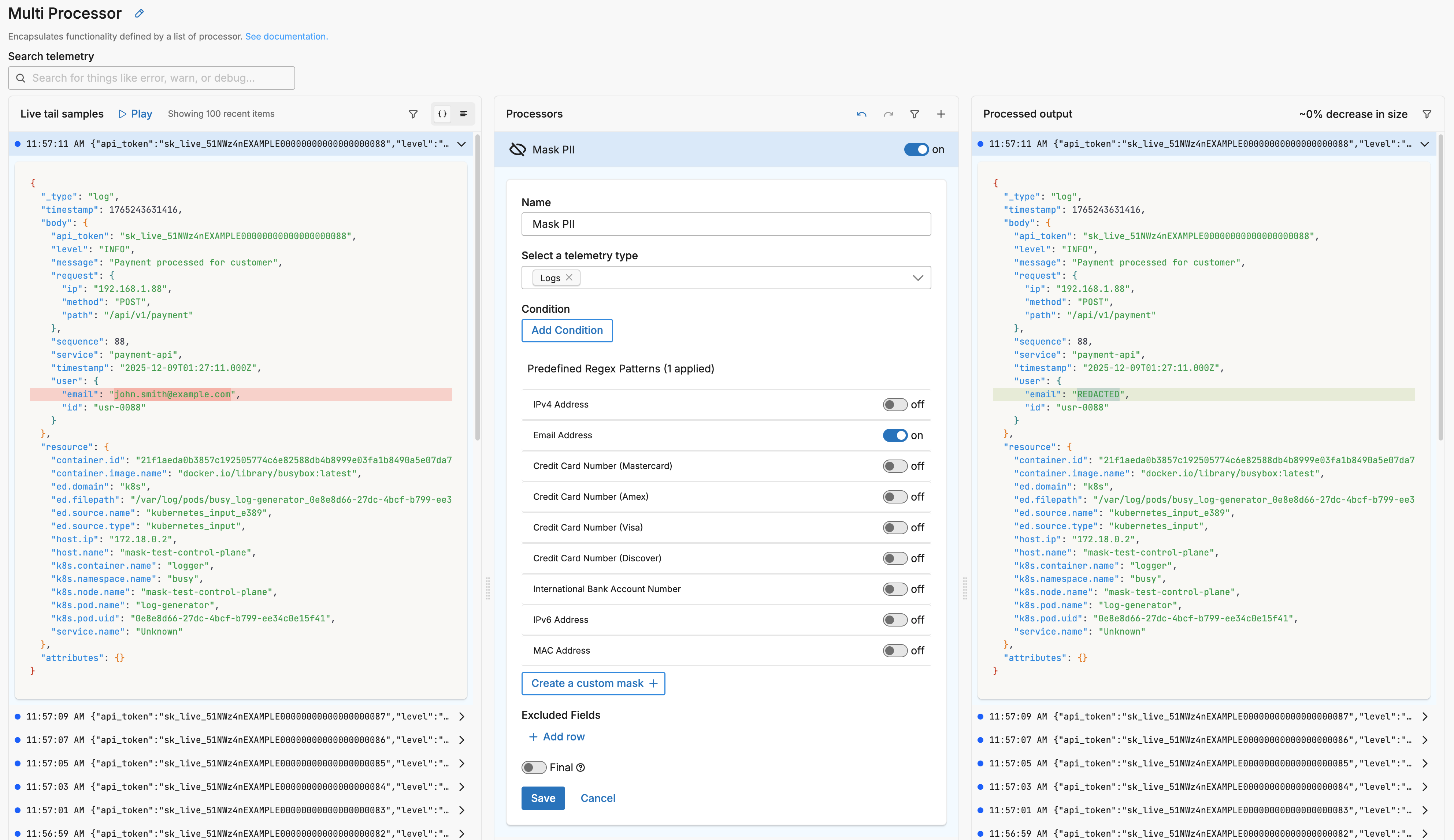
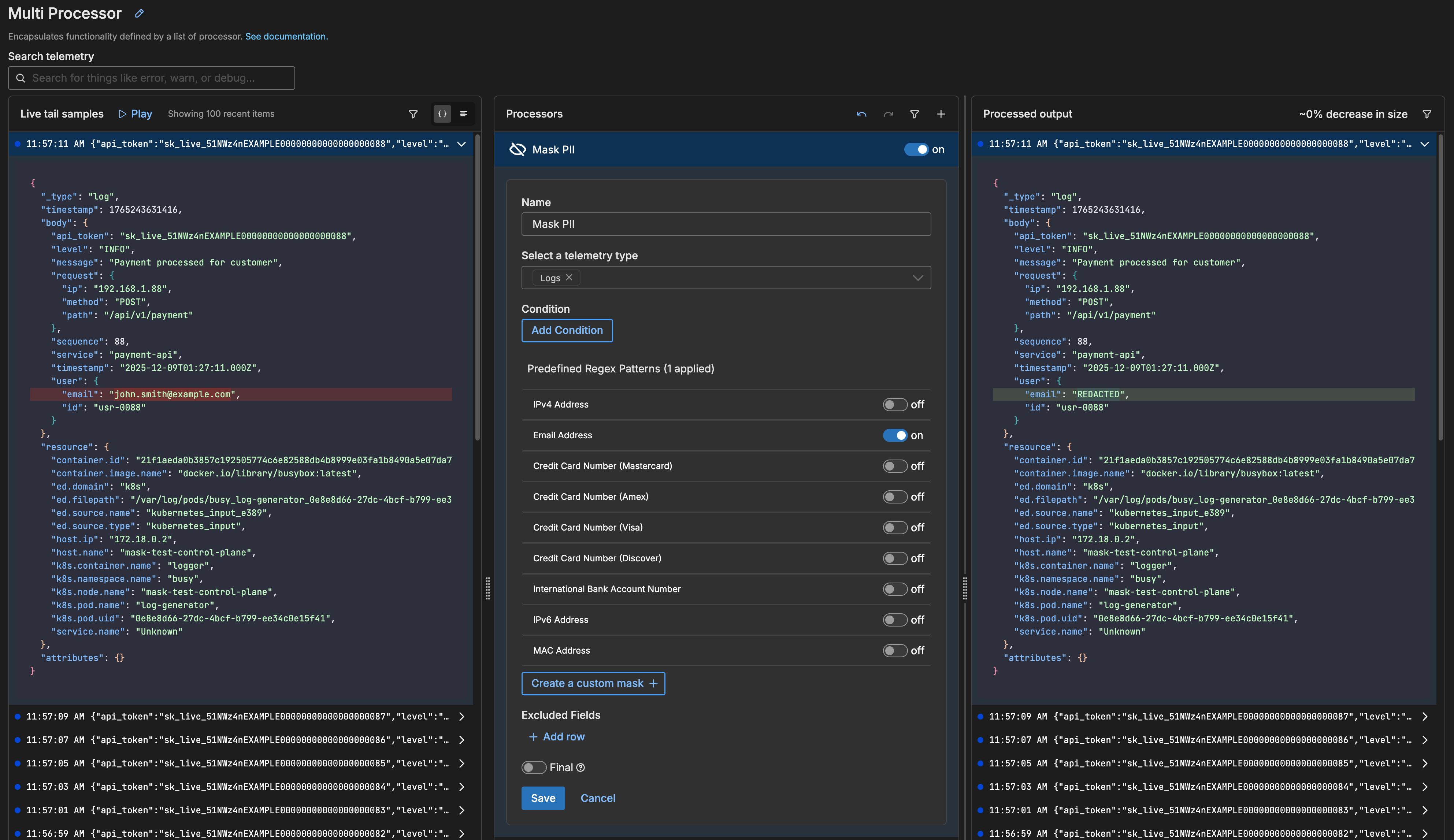
In this example, the email address attribute’s value has been replaced with the default word REDACTED.
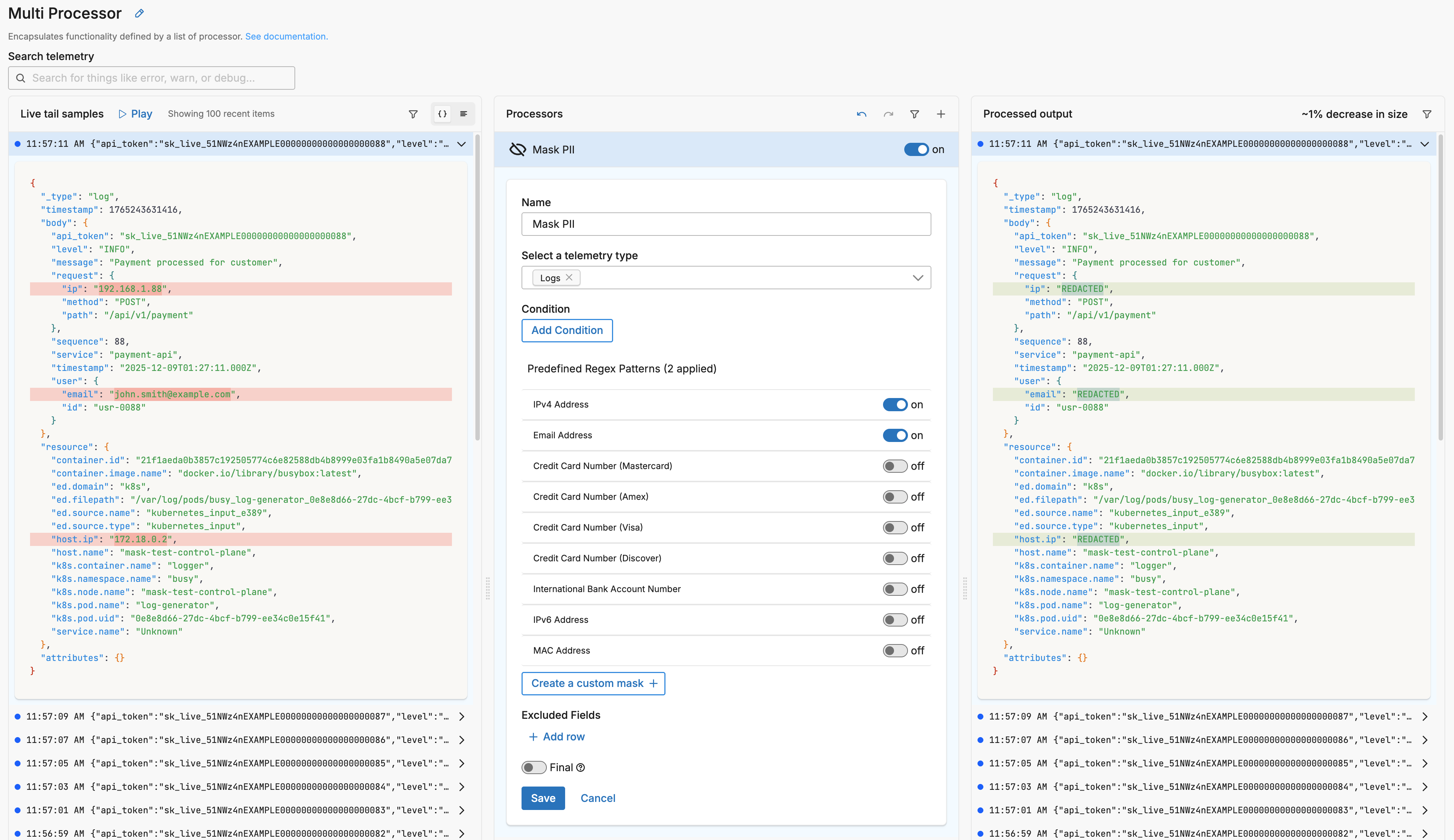
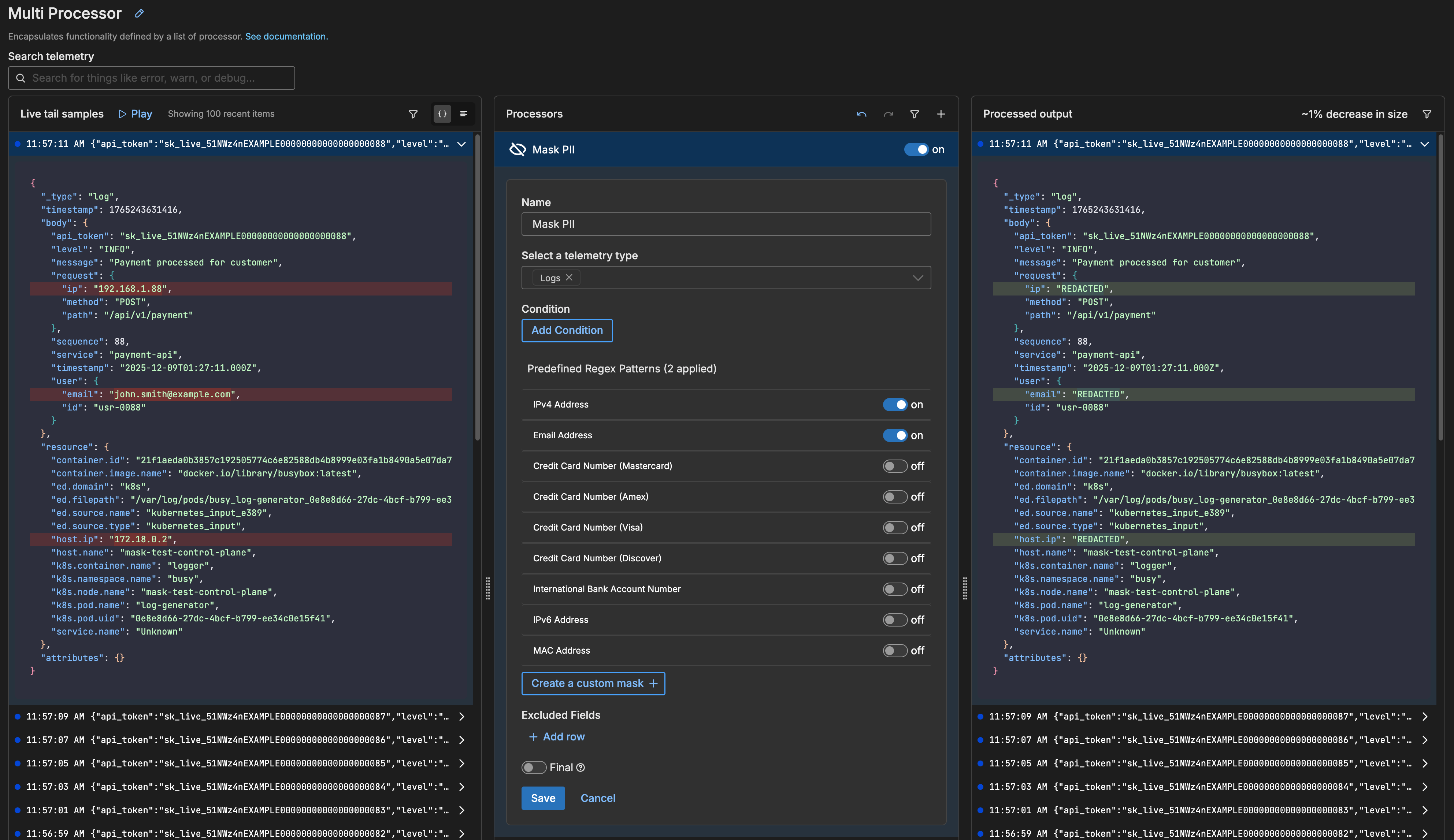
In this example, the IP addresses have also been redacted:
In this example, there is an API token in the body. You use a custom regex to capture and mask the value:
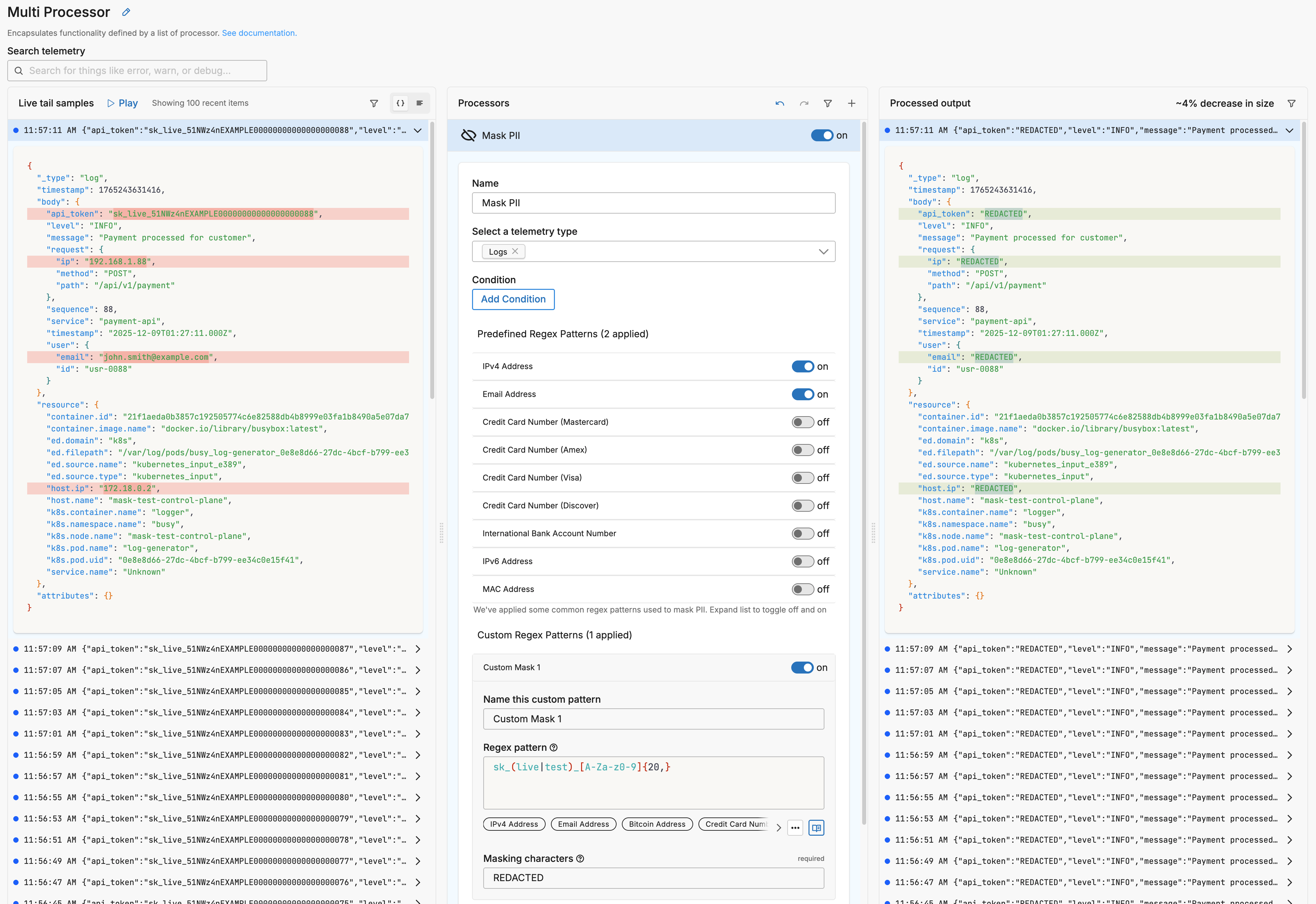
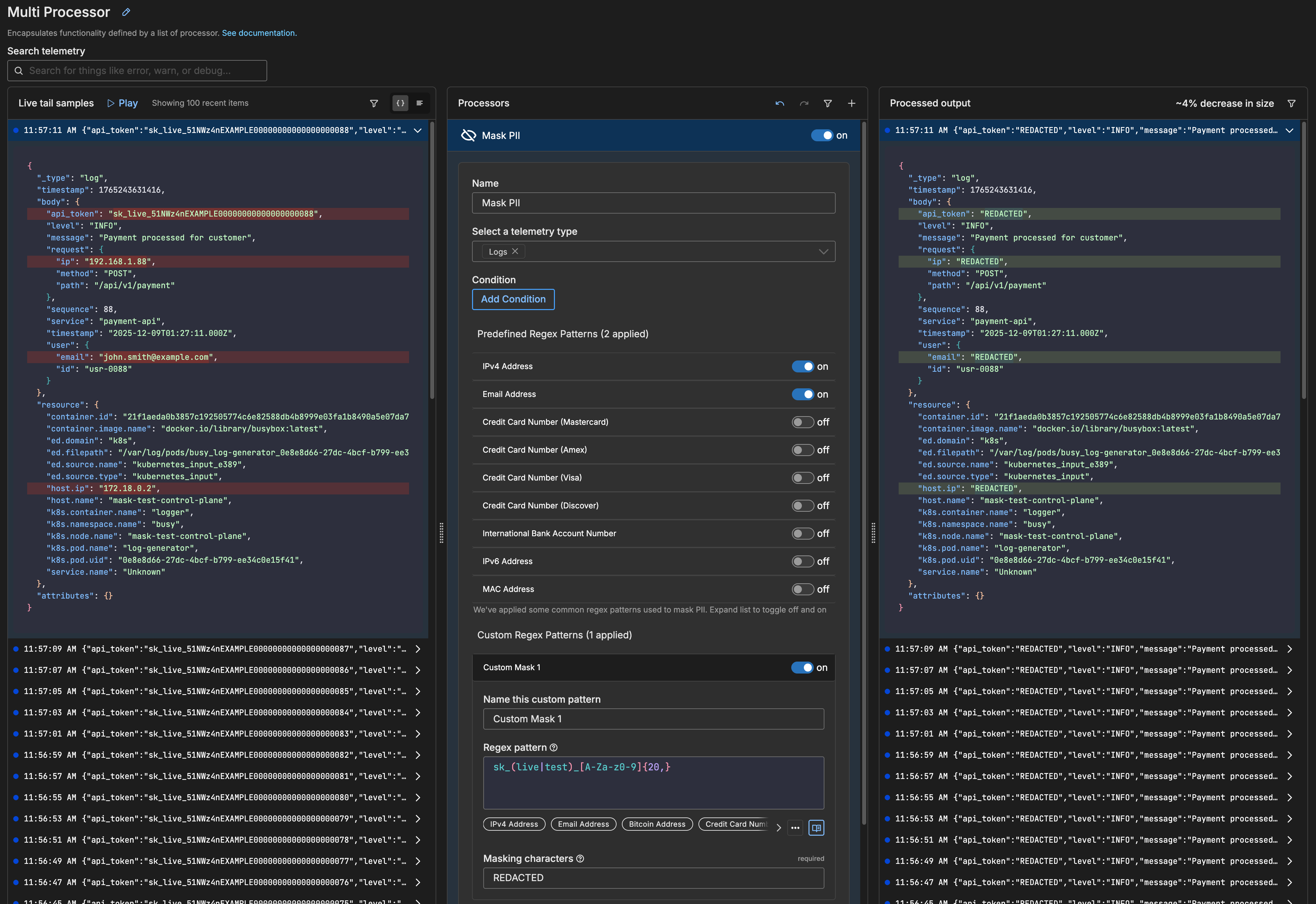
This is the input:
{
  "_type": "log",
  "timestamp": 1765243631416,
  "body": {
    "api_token": "sk_live_51NWz4nEXAMPLE00000000000000000088",
    "level": "INFO",
    "message": "Payment processed for customer",
    "request": {
      "ip": "192.168.1.88",
      "method": "POST",
      "path": "/api/v1/payment"
    },
    "sequence": 88,
    "service": "payment-api",
    "timestamp": "2025-12-09T01:27:11.000Z",
    "user": {
      "email": "john.smith@example.com",
      "id": "usr-0088"
    }
  },
  "resource": {
    ...
  },
  "attributes": {}
}
This is the pattern:
sk_(live|test)_[A-Za-z0-9]{20,}
This is the output:
{
  "_type": "log",
  "timestamp": 1765243631416,
  "body": {
    "api_token": "REDACTED",
    "level": "INFO",
    "message": "Payment processed for customer",
    "request": {
      "ip": "REDACTED",
      "method": "POST",
      "path": "/api/v1/payment"
    },
    "sequence": 88,
    "service": "payment-api",
    "timestamp": "2025-12-09T01:27:11.000Z",
    "user": {
      "email": "REDACTED",
      "id": "usr-0088"
    }
  },
  "resource": {
    ...
  },
  "attributes": {}
}
The pattern matches any string that looks like an API secret key. Note that when multiple mask patterns are enabled (email, IPv4, and custom API token in this example), all matching values are redacted in the output.
Options
Select a telemetry type
You can specify, log, metric, trace or all. It is specified using the interface, which generates a YAML list item for you under the data_types parameter. This defines the data item types against which the processor must operate. If data_types is not specified, the default value is all. It is optional.
It is defined in YAML as follows:
- name: multiprocessor
  type: sequence
  processors:
  - type: <processor type>
    data_types:
    - log
Condition
The condition parameter contains a conditional phrase of an OTTL statement. It restricts operation of the processor to only data items where the condition is met. Those data items that do not match the condition are passed without processing. You configure it in the interface and an OTTL condition is generated. It is optional.
Important: All conditions must be written on a single line in YAML. Multi-line conditions are not supported.
Comparison Operators
| Operator | Name | Description | Example |
|---|---|---|---|
== | Equal to | Returns true if both values are exactly the same | attributes["status"] == "OK" |
!= | Not equal to | Returns true if the values are not the same | attributes["level"] != "debug" |
> | Greater than | Returns true if the left value is greater than the right | attributes["duration_ms"] > 1000 |
>= | Greater than or equal | Returns true if the left value is greater than or equal to the right | attributes["score"] >= 90 |
< | Less than | Returns true if the left value is less than the right | attributes["load"] < 0.75 |
<= | Less than or equal | Returns true if the left value is less than or equal to the right | attributes["retries"] <= 3 |
matches | Regex match | Returns true if the string matches a regular expression (generates IsMatch function) | IsMatch(attributes["name"], ".*\\.log$") |
Logical Operators
Important: Use lowercase and, or, not - uppercase operators will cause errors!
| Operator | Description | Example |
|---|---|---|
and | Both conditions must be true | attributes["level"] == "ERROR" and attributes["status"] >= 500 |
or | At least one condition must be true | attributes["log_type"] == "TRAFFIC" or attributes["log_type"] == "THREAT" |
not | Negates the condition | not IsMatch(attributes["path"], "^/health") |
Functions
| Function | Description | Example |
|---|---|---|
IsMatch | Returns true if string matches the regex pattern | IsMatch(attributes["message"], "ERROR\|FATAL") |
Field Existence Checks
| Check | Description | Example |
|---|---|---|
!= nil | Field exists (not null) | attributes["user_id"] != nil |
== nil | Field doesn’t exist | attributes["optional_field"] == nil |
!= "" | Field is not empty string | attributes["message"] != "" |
Common Examples
- name: _multiprocessor
  type: sequence
  processors:
  - type: <processor type>
    # Simple equality check
    condition: attributes["request"]["path"] == "/json/view"

  - type: <processor type>
    # Multiple values with OR
    condition: attributes["log_type"] == "TRAFFIC" or attributes["log_type"] == "THREAT"

  - type: <processor type>
    # Excluding multiple values (NOT equal to multiple values)
    condition: attributes["log_type"] != "TRAFFIC" and attributes["log_type"] != "THREAT"

  - type: <processor type>
    # Complex condition with AND/OR/NOT
    condition: (attributes["level"] == "ERROR" or attributes["level"] == "FATAL") and attributes["env"] != "test"

  - type: <processor type>
    # Field existence and value check
    condition: attributes["user_id"] != nil and attributes["user_id"] != ""

  - type: <processor type>
    # Regex matching on attributes
    condition: IsMatch(attributes["path"], "^/api/") and not IsMatch(attributes["path"], "^/api/health")

  - type: <processor type>
    # Regex matching on body (case-insensitive)
    condition: IsMatch(body, "(?i)error")
Common Mistakes to Avoid
# WRONG - Cannot use OR/AND with values directly
condition: attributes["log_type"] != "TRAFFIC" OR "THREAT"

# CORRECT - Must repeat the full comparison
condition: attributes["log_type"] != "TRAFFIC" and attributes["log_type"] != "THREAT"

# WRONG - Uppercase operators
condition: attributes["status"] == "error" AND attributes["level"] == "critical"

# CORRECT - Lowercase operators
condition: attributes["status"] == "error" and attributes["level"] == "critical"

# WRONG - Multi-line conditions
condition: |
  attributes["level"] == "ERROR" and
  attributes["status"] >= 500

# CORRECT - Single line (even if long)
condition: attributes["level"] == "ERROR" and attributes["status"] >= 500
Predefined Regex Patterns
You can toggle on or off a number of predefined regex patterns such as email addresses, IP addresses, IBAN numbers, and more. If your sensitive data is not covered by these, you can create a custom mask and define a regex pattern.
When you select a predefined pattern, you can view the underlying regex being applied. You can also customize the replacement text for each pattern individually. By default, matched values are replaced with REDACTED, but you can change this to any text that suits your needs.
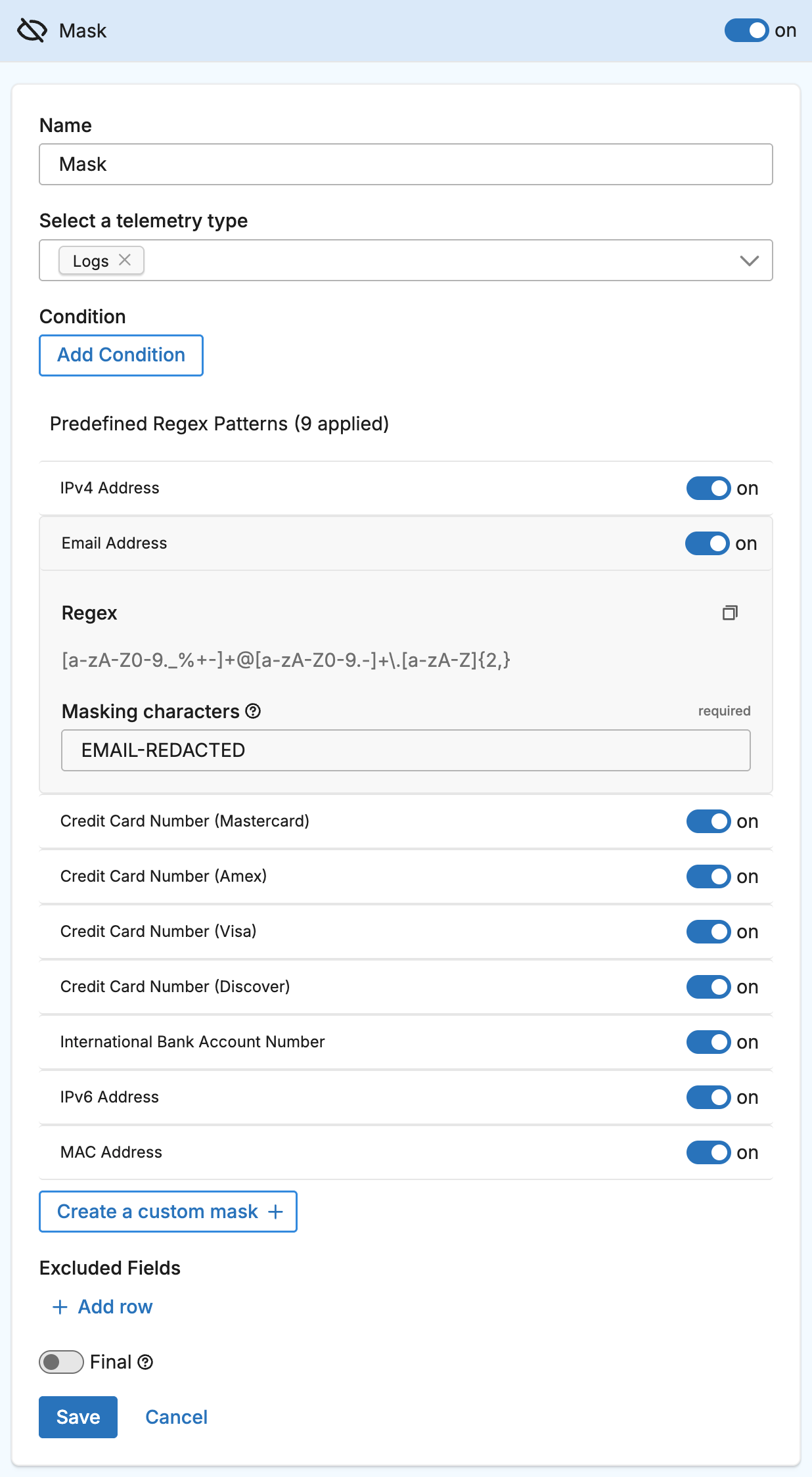

This allows you to:
- Use different replacement text for different data types, making it clear what kind of data was masked (for example,
[EMAIL_REMOVED]for emails and[IP_REMOVED]for IP addresses). - Align replacement text with your organization’s existing masking policies or compliance requirements.
Note: Custom regex patterns from the Knowledge Library can be made available as predefined patterns in the Mask Processor by adding the
ed_masking_defaulttag to the pattern. To remove a custom pattern from the predefined list, remove theed_masking_defaulttag from that pattern in the Knowledge Library.
Create a custom mask
Click Create a custom mask to add a mask pattern manually. There are a number of patterns you can quickly select from the regex patterns library. Alternatively, define your own pattern and test it in the live capture output pane. With a custom mask you can also define your own mask characters (REDACTED by default).
Capture group masks
When your regex pattern includes capture groups, you can specify a different replacement text for each capture group. This enables partial masking — for example, masking the domain part of an email address while keeping the username visible. Each capture group mask maps a group number to its replacement text.
Included Fields
If you want to restrict masking to specific fields, include them in the included fields section. When specified, only these fields and their children are masked. Fields not in this list are left unmodified even if they match the mask pattern.
Excluded Fields
If you have fields that you want to exclude from masking, include them in the excluded fields section. Even if the pattern matches these fields and their children, they will not be masked.
Final
Determines whether successfully processed data items should continue through the remaining processors in the same processor stack. If final is set to true, data items output by this processor are not passed to subsequent processors within the node—they are instead emitted to downstream nodes in the pipeline (e.g., a destination). Failed items are always passed to the next processor, regardless of this setting.
The UI provides a slider to configure this setting. The default is false. It is defined in YAML as follows:
- name: multiprocessor
  type: sequence
  processors:
    - type: <processor type>
    final: true
Configuration Wizard
Use this interactive wizard to generate a starter configuration:
Select a telemetry type
Select all telemetry types that contain data you want to protect
See Also
- For an overview and to understand processor sequence flow, see Processors Overview
- To learn how to configure a processor, see Configure a Processor.
- For optimization strategies, see Best Practices for Edge Delta Processors.
- If you’re new to pipelines, start with the Pipeline Quickstart Overview or learn how to Configure a Pipeline.
- Looking to understand how processors interact with sources and destinations? Visit the Pipeline Overview.